

To increase your Instagram engagement rate fast, publish carousels people want to save, strengthen Reel openings, start useful conversations through Stories and respond to genuine comments promptly. Use Instagram Insights to compare reach, likes, comments, saves and shares, then repeat the formats that work for your audience.
The fastest gains often come from improving how you present content rather than posting twice as much. A useful comparison on slide two, a clearer caption question or a Reel that explains its benefit immediately can change how viewers respond.
Quick Summary: Your Instagram Engagement Action Plan
Calculate your current engagement rate, test a practical 30-minute interaction routine around publishing, share educational carousels, and experiment with Trial Reels. Track results over multiple posts, not just the first hour. A higher number matters most when the interactions come from relevant viewers.
What Is a Good Instagram Engagement Rate in 2026?
A good Instagram engagement rate varies with follower count, content format, audience and calculation method. Later’s Instagram engagement benchmarks provide useful reference ranges, but they are guidelines rather than performance guarantees. Compare the same type of post using the same formula before making decisions.
Illustrative benchmark table (follower-based rate)
- Nano (under 10,000 followers): Later range 4–8%; example working target 4.5%
- Micro (10,000–100,000): Later range 2–4%; example working target 3.2%
- Mid-tier (100,000–500,000): Later range 1.5–3%; establish a personal baseline
- Macro (500,000–1 million): Later range 1–2%; example working target 1.8%
- Mega (over 1 million): Later range 0.5–1.5%; establish a personal baseline
The 4.5%, 3.2% and 1.8% figures above are illustrative targets drawn from the published ranges, not independent 2026 study averages. Benchmarks from different studies may vary because their samples and engagement formulas differ.
How to Calculate Instagram Engagement Rate
By reach: Engagement rate (%) = (likes + comments + saves + shares) ÷ accounts reached × 100. This shows the proportion of reached accounts that generated interactions, although repeat actions can make the figure differ from the percentage of unique people engaging.
By followers: Engagement rate (%) = (likes + comments + saves + shares) ÷ total followers × 100. This is useful for comparing accounts and posts when the same numerator and follower-based method are used consistently.
For example, a post with 120 likes, 18 comments, 32 saves and 10 shares records 180 interactions. At 3,000 accounts reached, its reach-based rate is 6%. If the account has 9,000 followers, its follower-based rate is 2%. Both calculations are correct, but they answer different questions.
For a fuller explanation of distribution and ranking signals, read Social Mention UK’s guide to how to beat the Instagram algorithm.
1. Use Educational Carousels with Audio to Encourage Saves
An educational Instagram carousel gives viewers something they can use again. A clear opening promise, a visual explanation and a final checklist can make a post more valuable than a series of attractive pictures. Audio is optional: it can support the experience, but there is no reliable rule that adding it doubles saves.
Buffer’s 2026 engagement study found a median reach-based engagement rate of 6.90% for Instagram carousels compared with 3.31% for Reels in its sample. Reels tended to reach further, so the stronger format depends on your objective.
Build a Seven-Slide Carousel
Slide 1 — Promise an answer. A beauty creator might open with “Are you applying your skincare products in the wrong order?” instead of a generic “Morning routine” title.
Slide 2 — Make the comparison obvious. Put two example routines side by side, with labels and a brief explanation. This is the right place for a bold visual comparison, not a second title slide.
Slides 3–5 — Teach the method. Explain what to do, when a step matters and the common error to avoid. Use one core idea per slide and readable text on mobile.
Slide 6 — Add a reference checklist. Condense the steps into a visual worth saving. Slide 7 — Ask one relevant question. For instance, “Which step would you like explained in detail?”
Images should be genuinely useful, properly licensed and easy to read. For practical design sources and usage considerations, see our guide to websites for social media photos and images.
Publish a small series using the same subject area, then compare save rate, shares, comments and reach. Testing the opening slide against a comparison-led opening is more informative than changing the topic, timing and entire design at once.
2. Run the 15-Minute Pre-Post Warm-Up Routine
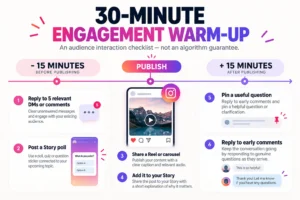
A simple posting routine is to interact with your audience for 15 minutes before publishing and stay available for another 15 minutes afterwards. It is a workflow for better conversations, not a verified Instagram ranking loophole. Choose a posting window from your own audience activity data.
Before publishing, respond to relevant unanswered messages and comments, use a Story poll to introduce the next topic and prepare a specific caption question. Once the new post is live, share it to your Story, respond to genuine questions and pin a useful clarification when appropriate.
A Repeatable 30-Minute Checklist
15 minutes before: reply to up to five unanswered DMs or comments where relevant; post a Story poll or question sticker that connects to your planned topic; check the caption and its call to action.
At publishing: post the Reel or carousel, share it to your Story and briefly explain what viewers will learn. Keep the Story text useful rather than simply writing “new post”.
15 minutes afterwards: answer early comments as they arrive, pin a helpful question if one exists, and note recurring audience requests for the next piece of content.
If nobody comments immediately, do not send repetitive messages or manufacture a thread. Use the time to review your posts’ questions and save insights. This is a scheduling habit, not an engagement guarantee.
Turn Stories into a Research Tool
Ask a question that helps decide the next post. A fitness creator might poll: “What is harder: finding time to work out or knowing where to start?” The answers can influence the content of a follow-up Reel. Story-sticker interactions and feed-post engagements are different metrics, so keep them separate in reports.
3. Write Keyword-Reply Captions and Start Meaningful Comment Threads
Specific questions lead to more useful conversations than generic “comment below” requests. A keyword-reply caption can work when you genuinely have a checklist, template or guide to send. The promised resource must exist and the reply process must deliver it.
For a tutorial on creating stronger hooks, a practical caption is: “Want my five-point Reel opening checklist? Comment CHECKLIST and I’ll send it.” For a comparison post, ask: “Would you choose option A or B for everyday use, and why?”
Use the Right Question for Each Format
Educational carousel: “Which mistake caught you out?” Tutorial Reel: “Which step needs a slower walkthrough?” Product comparison: “What would change your decision?” Small-business post: “What information would make choosing this service easier?”
Reply with context. If a reader asks about a step, answer the actual question and add an example. A substantive conversation is more valuable than a chain of identical emoji replies.
There are also paid comment products, such as SoldOutX’s Instagram comments service. This is a third-party commercial offer, not proof that purchased comments represent interested customers. Check the authenticity and policy implications carefully; Instagram’s Community Guidelines restrict artificially collected engagement.
For a long-term brand presence, use purchased-comment claims only as marketing claims until independently substantiated. Focus your everyday reporting on genuine audience questions, useful replies, shares and customer enquiries.
4. Use Trial Reels to Test Hooks on Non-Followers First
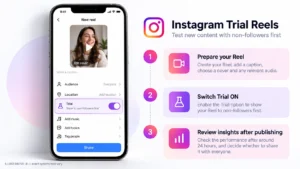
Instagram Trial Reels let creators test content with people who do not follow them before deciding whether to share it more broadly. That makes the feature helpful for experimenting with topics and opening hooks without immediately adding every idea to the main profile grid.
According to Meta’s official Trial Reels explanation, eligible users turn on the Trial option before posting. Around 24 hours later, they can review metrics such as views, likes, comments and shares; automatic sharing can consider performance within the first 72 hours.
How to Run a Useful Hook Test
Create a Reel with a clear message, strong first frame and readable cover. Enable Trial on the publishing screen if the option is available. Review its insights after approximately 24 hours; if the topic resonates, consider sharing it more widely.
For example, a skincare creator could test an explanatory opener — “Three ingredients beginners often confuse” — against a question-led opener on a separate creative concept. Avoid presenting one isolated result as proof that the first sentence caused all the difference.
Track watch time, shares, likes relative to reach, profile visits and other metrics available in your account. Some content may get many views but little relevant interest; that is a reason to improve message clarity rather than simply copying the format again.
If you are archiving your own videos for editing or reference, our Instagram Reels downloaders guide explains available tools and limitations. Respect copyright when working with anyone else’s content.
5. Accelerate Post Momentum by Reaching the Right Audience
Early interactions can make a new post look active, but visible numbers alone do not establish that its viewers are genuine or interested. A sustainable boost starts with reaching people who have a reason to care: existing subscribers, customers, collaboration partners or an audience selected through official advertising.
Some providers market packages of Instagram likes. For example, SoldOutX advertises real Instagram likes. The word “real” is the seller’s claim, not independently verified proof of account authenticity or an Instagram recommendation advantage. Assess the quality, policies and disclosure implications before using an engagement package.
Illustrative Mini Case Study: A UK Beauty Creator
Hypothetical example — not an observed or verified customer success story. Imagine a UK beauty micro-creator with 9,400 followers and a follower-based engagement rate of 1.6%, or roughly 150 interactions on an average post. She adopts the warm-up routine, replaces a generic carousel slide two with a useful comparison and answers more product questions in comments.
Reaching 4.9% at the same follower count would require about 461 interactions per post. A third-party package marketed as 150 likes plus 15 custom comments would add 165 visible actions if delivered and retained, but that alone would not prove real reach, audience growth or a brand’s willingness to sponsor the creator. Likewise, a £450 sponsorship is a hypothetical commercial objective here, not a documented outcome.
That distinction matters to brands evaluating partnerships. See our guide to becoming a lifestyle influencer in the UK for further context on niche positioning, audience trust and brand relationships.
Measure the Right Kind of Momentum
Compare reach, saves, shares, meaningful comments, profile visits, enquiries and subsequent posts. If likes rise while relevant audience actions remain flat, the increase may not represent a useful improvement. Use consistent measurement windows and avoid attributing results to any single tactic without a controlled comparison.
Frequently Asked Questions
What is a good engagement rate on Instagram in 2026?
It depends on audience size, niche and measurement method. Later’s guide gives typical nano-account rates of 4–8% and micro-account rates of 2–4%. Compare like-for-like post formats with the same formula and treat broad industry ranges as reference points.
How do you calculate Instagram engagement rate accurately?
Add likes, comments, saves and shares, divide by accounts reached or followers, and multiply by 100. Reach-based engagement assesses interactions relative to exposure; follower-based engagement supports account-size comparisons. Always state which denominator you used.
Do carousels or Reels achieve higher engagement?
Carousels led on reach-based engagement in Buffer’s 2026 analysis, while Reels generally offered greater reach. Use carousels for deeper educational interactions and Reels when discovery matters, then confirm those tendencies with your own audience data.
Does removing ghost followers improve engagement rate?
It may raise a follower-based percentage mathematically when interactions stay constant and follower count falls. Removing followers is not a guaranteed way to improve reach or relationship quality. Avoid indiscriminate removal and risky automation tools.
Do first-hour likes and comments increase reach?
Early responses show whether people are engaging with a post, but Instagram does not publish a guaranteed first-hour likes threshold. Genuine watch time, likes, shares and audience relationships all matter differently across placements. Prioritise content that earns interest.
Final Verdict
Improving Instagram engagement is about giving people a stronger reason to act. Teach something worth saving, test compelling Reel openings, ask relevant questions and make time for authentic conversation around publishing.
For the next two weeks, choose three repeatable topics, alternate carousels and Reels, and log the same four metrics after each post: reach, saves, shares and comments. Keep the formats that attract genuine responses from the audience you want, then build the next content cycle around what you learned.

Discussion