


Quick Summary Box
Your Instagram reach is dropping in 2026 either because Instagram’s algorithm is holding back your posts from non-followers in Explore and Reels due to low watch time or Account Status flags, or because weak relationship signals are burying your posts in follower feeds.
Before changing your posting schedule or deleting content, you need to isolate which ranking system has stalled. According to Socialinsider’s 2026 Social Media Reach Study, which analysed over 72.5 million Instagram posts, average organic reach fell 14% year-on-year to a baseline reach rate of 4.90% of followers (with engagement by reach sliding to 3.20% by August 2026). If your account is experiencing a gradual slide toward ~5% of your follower count, you are seeing a platform-wide recalibration. If your reach plunged by 50% to 90% overnight, you are dealing with a specific technical or behavioural trigger that requires targeted troubleshooting.
| Primary Symptom in Instagram Insights | Where the Drop Occurs | Root Algorithmic Cause | Immediate Diagnostic Fix |
|---|---|---|---|
| Sudden 50%–90% drop overnight across all formats | Non-Follower Reach (Explore, Reels tab, Search) | Silent recommendation restriction or flagged post in Account Status | Fix 1: Audit Settings > Account Status and appeal or remove flagged media |
| Reels stall at 200–500 views despite steady follower likes | Non-Follower Reach (Reels tab seed pool) | High 3-second Skip Rate (>50%) and weak watch-time retention | Fix 2: Replace slow intros with 0–3 second pattern-interrupt hooks |
| Story views stuck below 2%–3% of total followers | Follower Reach (Story tray ranking) | Multi-slide completion fatigue pushing your ring to the back of the tray | Fix 3: Execute a 24-hour Story blackout followed by a 1-slide poll |
| Individual Reels or Carousels flatline below 15% non-follower reach | Non-Follower Reach (Unconnected discovery surfaces) | Visible third-party watermarks, >5 hashtags, or unoriginal/reposted media | Fix 4: Strip external watermarks, cap tags at 5, and use SEO captions |
| Posts earn polite follower likes but never hit Explore | Both Follower & Non-Follower Reach | Weak first-hour velocity in high-weight signals (Saves and DM Sends) | Fix 5: Rebuild 60-minute Save and DM Send velocity via shareable assets |
Step 1: Check Your Instagram Insights (Follower vs Non-Follower Drop)
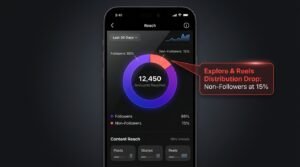
To fix a sudden Instagram reach decline, open your Professional Dashboard and inspect the Followers versus Non-Followers split inside Post Insights. A non-follower drop signals an Explore or Reels distribution issue, whereas a follower drop points to weak feed and Story relationship signals
As head of Instagram Adam Mosseri outlines in Instagram Ranking Explained, Instagram does not use a single master algorithm. Instead, it operates separate ranking classifiers for connected surfaces (Home Feed and Stories, where people catch up with accounts they already follow) and unconnected discovery surfaces (Explore, the Reels tab, and Suggested Posts, where people discover accounts they do not follow yet). Auditing your reach split over your last 10 to 15 posts tells you immediately which classifier is throttling your distribution so you do not apply the wrong remedy
- Diagnosing a Non-Follower Reach Drop (Non-Followers < 20% on Reels/Carousels): Healthy discovery Reels on growing UK and US creator accounts typically generate 50% to 80% of their reach from non-followers. When non-follower reach collapses below 15%–20%, Instagram’s unconnected recommendation engine is either blocking your account at the eligibility gate (Account Status, watermarks, or unoriginal content) or halting your post after its initial small-audience test pool because of a high three-second skip rate or low sends per reach.
- Diagnosing a Follower Reach Drop (Home & Story Reach Down > 30%): If your follower reach count has declined across both static carousels and Stories, the issue is relationship decay rather than a “shadowban”. Instagram ranks your posts in a follower’s Home Feed based on their recent interaction history with you—specifically direct messages, comment threads, profile taps, and time spent reading your posts. It is also important to check your benchmark against your account size: Socialinsider’s benchmark tracking shows that smaller profiles (1K–5K followers) average a 6.65% reach rate, mid-tier accounts (10K–50K) average 5.50%, and larger accounts (100K–1M) average just 3.50%.
- Checking Format Distribution Shifts: Do not assume Reels automatically out-reach every other format. In 2026 benchmark tracking across 72.5 million posts, Carousels actually achieve the highest average reach rate on Instagram at 4.50%, edging out Reels (4.10%) and single images (4.00%). If your Reels reach has dipped, compare it against a multi-slide educational carousel to determine whether the slump is format-specific or account-wide.
Fix 1: Verify Your “Account Status” for Hidden Recommendation Blocks
If your non-follower reach has collapsed to near zero, check Settings and Activity, then select Account Status to verify whether Instagram has placed a silent recommendation restriction on your profile, blocking your Reels and posts from appearing in Explore, Search, and Suggested Feeds.
Many creators assume a sudden 80% drop in impressions means they have been “shadowbanned” without recourse. In practice, Meta distinguishes between Community Standards (rules that get content deleted) and Meta’s official recommendation guidelines, which govern what Instagram is willing to amplify to unconnected audiences. A post can remain live on your profile for existing followers while being marked ineligible for Explore, the Reels tab, Search results, and “Suggested for You” modules. Worse still, if an account repeatedly publishes content that triggers Recommendation Guidelines classifiers, Instagram temporarily suspends recommendation eligibility across the entire profile.
Follow this step-by-step audit to check and clear silent restrictions:
- Open Account Status: Tap your profile picture, open the top-right three-line menu (Settings and Activity), scroll down to the For professionals or More info and support section, and tap Account Status.
- Inspect “What Can’t Be Recommended”: Confirm that both Removed content and messaging issues and What can’t be recommended display green ticks. If you see an orange exclamation mark next to What can’t be recommended, tap it to view the exact Reel, carousel, Story, or bio keyword triggering the block.
- Resolve or Appeal the Trigger: Instagram gives you two choices when a post is flagged—either edit/delete the offending post (or bio text) to lift the restriction immediately, or submit an in-app appeal if an automated classifier misread benign content (common in fitness, aesthetics, finance, medical education, and news commentary niches). In practice, deleting a mistakenly flagged post restores green recommendation status faster than waiting several days for a human appeal review.
- Audit Profile-Level AI and Bio Flags: Profiles featuring photorealistic AI-generated media without Instagram’s native AI Info disclosure label, or bios containing banned external link shorteners, can also suffer reduced unconnected distribution under Meta’s transparency updates.
Fix 2: Lower Your Reels Skip Rate with Pattern-Interrupt Hooks
High Reels skip rates during the opening three seconds halt algorithmic distribution before non-followers ever see your video. Replacing slow introductions with immediate visual motion, bold on-screen benefit text, and pattern-interrupt cuts keeps your three-second skip rate below the critical forty percent threshold.
In late 2025 and throughout 2026, Instagram replaced the legacy “View Rate” metric inside Reels Insights with Skip Rate, accompanied by an interactive second-by-second Retention chart (Metricool’s Instagram Reel Analytics Guide). Skip Rate measures the exact percentage of viewers who scroll past your Reel within the first three seconds, while the Retention curve tracks the percentage of remaining viewers who stay through the middle and end of the video. Because Instagram for Creators’ official FAQ explicitly emphasises making the first three seconds engaging so viewers do not move on, a high Skip Rate kills your video during its initial small-audience seed test. Industry tracking in BabbleBoxx’s 2026 Skip Rate Benchmark Report indicates that a Skip Rate under 30%–40% signals a healthy hook, whereas a Skip Rate above 50% causes distribution to stall prematurely.
To bring your Skip Rate under 35% and flatten your mid-video retention curve, restructure your video openings around three engineering rules:
- Combine Triple-Channel Hook Signals at Second 0.0: Never open a Reel with a breath pause, a greeting (“Hey guys, today I want to talk about…”), or a static wide shot. Your very first frame must combine three simultaneous elements: immediate physical movement (a camera push-in, hand gesture, or before/after reveal), a high-contrast six-to-eight-word on-screen text hook stating the concrete outcome, and a spoken opening line that starts mid-thought.
- Insert Micro-Reveals at 25% and 60% of Runtime: Open your Reel’s Retention card in Insights and identify the exact second where the line dips steepest. Place a visual pattern interrupt—such as a b-roll overlay, angle change, or on-screen graphic—half a second before that typical drop-off point.
- Respect the 3-Minute Recommendation Cap and Pair with Fast Engagement Loops: Reels longer than 3 minutes are not recommended to unconnected audiences at all. Keep growth Reels between 7 and 35 seconds so completion rates stay high, and pair stronger retention with proven tactics for increasing your Instagram engagement rate fast so viewers who watch to the end convert into active commenters and sharers.
Fix 3: Execute the 24-Hour Story Reset to Triple Story Views
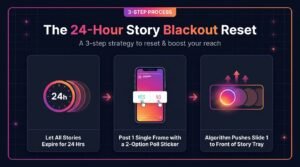
When your Instagram Story views stall, stop posting Stories for a full twenty-four hours so every active slide expires completely. Once your tray is empty, publish a single high-contrast Story featuring a two-option poll sticker to concentrate viewer taps and reset tray ranking.
The Stories algorithm orders the rings at the top of a follower’s app using three primary input signals: Viewing history (how often a follower views your Stories), Engagement history (how often they send a Story like, tap a sticker, or reply via DM), and Closeness (overall relationship strength). When you post 10 to 15 Story frames every day without a break, followers inevitably swipe away mid-stack. Those exits drag down your frame-to-frame completion rate, training the classifier to predict that viewers will skip your Stories—which pushes your profile ring further to the right of their Story tray each morning.
- Let Every Active Story Expire (Hours 0–24): Stop uploading to your Story for a minimum of 24 hours after your last frame disappears. Do not repost feed teasers, countdowns, or links during this window; your profile ring must remain completely inactive for a full day.
- Publish One Single Frame with a Low-Friction Two-Option Poll (Hour 25): Break the silence with exactly one Story slide—never a three-slide batch. Use a clean visual background, a concise 8-to-12-word question relevant to your niche, and a native 2-Option Poll Sticker placed near the lower-centre thumb zone where viewers naturally tap. Because there is no “Slide 2” for viewers to abandon, every viewer who opens the frame registers a 100% completion rate, while the binary poll converts passive viewers into active engagers.
- Wait 4 to 6 Hours Before Adding a Second Slide: Allow that single poll frame to accumulate views and sticker taps for at least four to six hours. As the interaction-to-impression ratio spikes on Slide 1, Instagram’s Story ranking model moves your ring back toward the front of your followers’ Story trays. When you finally post a second frame later that day, include a DM reply prompt to lock in the Closeness signal.
Fix 4: Remove Watermarks, Banned Hashtags, and Engagement Bait
Instagram’s automated content classifiers actively demote Reels and carousels that display third-party watermarks, rely on recycled unoriginal clips, exceed the five-hashtag limit, or use manipulative engagement bait. Stripping external logos and switching to keyword-rich captions restores full eligibility across unconnected discovery surfaces.
Even when your Account Status shows green ticks, individual posts can be suppressed by post-level quality filters that never trigger a formal warning notification. Meta’s distribution systems automatically reduce the visibility of content exhibiting specific low-quality signals, as outlined in Instagram’s originality and audience recommendations update. At the same time, outdated growth advice from 2022–2024—such as pasting blocks of 30 hashtags or reposting viral clips—now actively harms reach in 2026.
Audit your recent drafts and published posts against these four technical filters:
- Third-Party Watermarks and Borders: Uploading a video that displays a bouncing TikTok logo, a CapCut end-card, an external editing app watermark, or black aspect-ratio borders triggers an immediate recommendation demotion. Always export raw, clean vertical video (1080×1920 at 30 or 60 fps) before editing, or edit directly inside Instagram or Meta’s native Edits app.
- Unoriginal Aggregated Content: Under Instagram’s originality ranking system, reposting other creators’ videos, memes, or carousels without substantial creative transformation (such as split-screen commentary, face-cam reaction, or voiceover analysis) causes Instagram to replace your repost in recommendations with the original creator’s post—and accounts that repeatedly aggregate unoriginal clips lose platform-wide recommendation eligibility.
- Hashtag Stuffing Beyond the 5-Hashtag Cap and Flagged Tags: As analysed in Unfollr’s 2026 Reach Diagnostic Guide, Instagram enforces a 5-hashtag limit per post and relies primarily on caption keywords for search discovery. Using banned or spam-flagged hashtags, or stuffing irrelevant trending tags into your caption, confuses the audience-matching classifier and depresses early engagement rates. Use 3 to 5 specific niche hashtags and weave natural search phrases directly into your opening two caption lines and on-screen text.
- Clickbait and Artificial Engagement Bait: Posts that withhold basic context to force interactions (“Watch until the end or you’ll have bad luck”, “Like this post if you agree”, or unverified giveaway bait) are downranked by Instagram’s user-survey quality models. Replace generic bait with genuine utility—such as offering to send a detailed checklist or template when a viewer comments a specific keyword.
Fix 5: Rebuild First-Hour Velocity to Trigger Explore Distribution
Rebuilding first-hour engagement velocity requires concentrating high-intent signals—specifically saves, direct message sends, and multi-slide carousel completions—within the first sixty minutes after publishing. Strong early save and share ratios convince Instagram’s small-audience test classifier to expand your post into wider Explore and Reels pools.
When you publish an eligible, watermark-free Reel or carousel, Instagram first shows it to a small sample audience of followers and matched non-followers. Whether your post stalls at 400 views or scales to 10,000+ depends on signal velocity during that initial test window. As documented in CreatorFlow’s 2026 Instagram Algorithm & Reach Analysis, Instagram weights three metrics above all others: watch time, sends per reach (DM shares), and saves/likes per reach—with DM sends and saves carrying the heaviest weight for pushing content to unconnected audiences in Explore and Reels.
When an account has suffered weeks of suppressed reach, its organic first-hour velocity often drops so low that even strong new posts fail to clear the initial seed test. Alongside structural content hooks that encourage organic bookmarking and DM sharing, some creators choose to buy Instagram saves to trigger Explore recovery through growth platforms like SoldOutX to supplement early post momentum while rebuilding organic audience habits.
Before vs. After Callout Box — UK Creator Reach Recovery Case Study: A Manchester-based UK lifestyle creator with 12,500 followers saw her average Reel views plunge from 6,000 down to 450 over ten days after reposting a TikTok video carrying a visible third-party watermark. An Insights audit revealed her non-follower reach had collapsed to just 11%, while Account Status flagged the watermarked clip as ineligible for recommendation. To fix the drop, she deleted the flagged video, completed a strict 24-hour Story blackout reset with a two-option poll sticker, and published four original 15-second Reels over the next week. To jumpstart early velocity, she seeded each Reel with 80 saves and 150 likes via SoldOutX alongside organic DM share prompts. Within seven days, her non-follower reach rebounded to 62%, averaging 9,100 views per Reel.
To maximise first-hour velocity sustainably—whether you rely purely on organic triggers or pair them with external seeding- apply this three-part execution framework
- Engineer Reference-Grade “Saveable” Frames: Viewers rarely bookmark purely entertaining clips, but they consistently save step-by-step checklists, cheat sheets, scripts, settings tables, and recipe/workout breakdowns. On Reels, flash a dense, high-value summary list on screen for 2.5 seconds near the end of the video with a caption callout: “Save this checklist so you have the exact settings before your next upload.” On Carousels (which lead all formats at a 4.50% average reach rate), make the final slide a one-page summary table designed specifically for bookmarking.
- Build “Send to One Friend” Triggers into the Concept: Because Adam Mosseri has highlighted sends per reach as one of the strongest ranking signals for reaching people who do not follow you yet, ask yourself before filming: “Which specific friend or colleague would a viewer DM this to, and why?” Content that solves an urgent shared problem or articulates an unspoken industry truth earns organic DM shares far faster than generic tips.
- Convert First-Hour Comments into Two-Way DM Threads: Reply to every comment within the first 60 minutes using an open-ended follow-up question rather than an emoji, and use keyword-triggered DMs to move engaged viewers into private messages. Because two-way message history is a primary Home Feed and Story ranking signal, today’s DM conversations directly increase your connected first-hour velocity on tomorrow’s post.
- Understand Material Limitations of External Signal Seeding: If you use third-party engagement services to jumpstart save or like counts, treat them strictly as a supplementary catalyst rather than a replacement for hook retention. Artificial velocity cannot rescue a Reel with a 65% three-second skip rate, an active Account Status penalty, or a visible watermark—if unconnected viewers immediately scroll past once the post hits Explore, the algorithm will halt distribution again.
Frequently Asked Questions
These five frequently asked questions address the most common technical causes behind sudden Instagram reach drops in 2026, providing concise diagnostic checks for Account Status restrictions, non-follower distribution stalls, Story blackout resets, Reels skip-rate benchmarks, and save-driven Explore velocity recovery.
1. Why did my Instagram reach suddenly drop to almost zero?
A sudden collapse to near-zero reach almost always indicates an Account Status restriction, a post flagged for violating Recommendation Guidelines, or a visible third-party watermark. Less dramatic declines usually reflect high three-second Reels skip rates or weak DM share velocity.
2. How do I check if Instagram is restricting my non-follower reach?
Open your profile menu, tap Settings and Activity, and select Account Status. Check the What Can’t Be Recommended tab for orange warning icons, then compare your Followers versus Non-Followers reach percentage inside individual Post Insights to confirm distribution limits.
3. Does the 24-hour Instagram Story reset actually work?
Yes, letting all active Stories expire for twenty-four hours clears middle-slide drop-off penalties that drag down completion rates. Publishing a single Story with a two-option poll sticker afterward concentrates viewer taps on Slide 1, pushing your ring forward in follower trays.
4. What is a good Reels skip rate to aim for in Instagram Insights?
While Instagram does not publish an official skip-rate threshold, 2026 analytics benchmarks show that a three-second skip rate below 30% to 40% signals a strong hook. Skip rates above 50% indicate viewers are scrolling past before your message starts.
5. How do saves help recover a stalled Instagram account?
Instagram’s Explore ranking system predicts whether unconnected users will find a post valuable enough to bookmark. High first-hour save velocity signals long-term reference utility, prompting the algorithm to graduate your post from initial seed testing into broader non-follower recommendation pools.
Final Verdict
Fixing a dropping Instagram reach in 2026 requires diagnosing whether your decline stems from follower fatigue or non-follower recommendation blocks before changing your content calendar. Auditing Account Status, cutting three-second skip rates, resetting Stories, and rebuilding save and share velocity restores sustainable growth.
Rather than panic-posting five times a day—which only dilutes your average engagement per post—work through this diagnostic sequence in order over the next seven days:
- Day 1 (Audit & Clean): Check Settings > Account Status for silent recommendation flags, inspect your last 10 posts for a Follower vs Non-Follower drop, remove any recent Reel carrying a third-party watermark, and initiate your 24-hour Story blackout.
- Day 2 (Story Tray Reset): Break your 24-hour Story silence with a single, high-contrast Story frame featuring a binary poll sticker, then wait at least four hours before posting a second frame.
- Days 3–7 (Hook & Velocity Rebuild): Publish three to four original Reels (under 35 seconds, zero watermarks, maximum five niche hashtags) engineered with triple-channel 0–3 second hooks to push your Skip Rate below 40%, paired with high-utility carousel or checklist frames designed to drive first-hour Saves and DM Sends.

Discussion