

Quick answer
Focus on the signals Adam Mosseri has named as most important: watch time, likes per reach and sends per reach. Instagram ranks Feed, Stories, Explore and Reels with separate systems, so tailor each post to where it will appear. Reposted reels are recommended less.
How Instagram’s 4 Algorithms Actually Work in 2026
Instagram doesn’t run one ranking system. Feed, Stories, Explore and Reels each use their own algorithm, tuned to how people use that part of the app. Instagram’s own ranking explainer says people tend to look for close friends in Stories, discover new creators in Explore and watch entertaining videos in Reels. Each surface rewards different behavior. The explainer also describes thousands of signals without publishing exact weights, which is why a tactic that helps on one surface can do little on another.
The table below summarizes the signals Instagram has described for each surface. Treat it as a planning guide rather than a formula.
| Surface | Mainly shows | Signals Instagram has described | Where to focus |
|---|---|---|---|
| Feed | Posts from accounts you follow, plus recommendations and ads | Your activity (likes, comments, saves), information about the post and poster, and your history with that poster | Saves and comments from existing followers |
| Stories | Stories from accounts you follow | Viewing and engagement history, your relationship with the author, and how likely you are to tap in, reply or skip ahead | Strong opening frames, replies and DMs |
| Explore | Content from accounts you don’t follow | Post popularity, likes, saves and shares, how quickly they arrive, and your activity in Explore | Engagement from new viewers |
| Reels | Mostly videos from accounts you don’t follow | Watch time, likes per reach and sends per reach, plus quality and originality guidelines | Completion rate and DM shares |
Adam Mosseri’s 2025 video series named watch time, likes and sends as the three signals that matter most. Sends carry more weight when the question is whether a post reaches people who don’t follow you, while likes matter more for content shown to your existing audience.
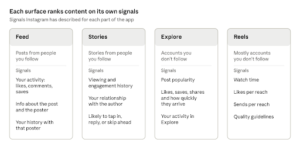
Based on Instagram’s ranking explainer and Adam Mosseri’s 2025 signal summary
Each surface weighs different signals, so a post that works on Reels may not carry over to Feed.
Agencies managing several accounts face the same mechanics at higher volume. Our guide to scaling social media presence for agencies covers how to organize that work.
1. Optimize Reels for Watch Time and DM “Sends Per Reach”
Reels are built for discovery, so most of the people you reach won’t follow you yet. That makes watch time and sends the two levers worth managing.
Watch time starts in the first second. Show the payoff or the problem in the opening frame, then keep the pacing tight enough that viewers have a reason to stay. Put text on screen only where it adds information, and make sure it’s readable on a phone. Viewers often watch with the sound off, so captions help them follow the point and stay longer.
Sends per reach is the number of DM shares divided by the number of accounts that saw the post. A Reel is worth sending when it gives a friend something specific: a tip they can use today, a scenario they recognize, or a clear answer to a question people already ask each other. Mosseri has cautioned against forced attempts to game sends, so write for the viewer first. A prompt that reads like a demand, such as “send this to five friends,” tends to feel like the kind of artificial tactic Instagram warns about.
Production quality matters too. Instagram’s recommendation guidelines make reels less visible when they are watermarked, low resolution, muted, bordered or mostly text. Export at full resolution, remove watermarks from other platforms and avoid letterboxing. None of these fixes is glamorous, but they remove a reason for the system to hold your video back.
2. Use Carousels & Saves to Trigger the “Second-Chance” Feed Push
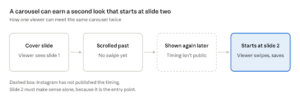
Carousels can earn reach in two ways. Mosseri has said carousels can outperform single images because more slides mean more interactions. He has also said that when someone sees a carousel and doesn’t swipe, Instagram will often give it a second chance by showing it again, starting from the second slide. Instagram hasn’t published the timing or frequency, so plan for the second look without assuming when it will happen.
That means slide two has to work on its own. Someone who never saw the cover should understand what the post is about from the second slide, whether through a clear statistic, a question or the first step of a process. Keep each slide to one idea, and end with a slide that asks for the action you want, such as saving the post for later.
Saves are a stated activity signal in Feed and Explore. A post people return to, such as a checklist, template or step-by-step process, is the kind of content that earns a save. Ask for the save only when the content has earned it. Asking for saves on a weak post doesn’t change the outcome.
Creator-reported pattern; Instagram has not published the timing
Slide two is the entry point for anyone who scrolled past the cover, so it has to stand alone.
If you are weighing paid options, you can buy real Instagram saves from SoldOutX, but read the risks in section 4 before you buy anything.
3. Boost Story Retention with First-Slide Interactive Stickers
Stories rank by predicting what a viewer will do next: whether they’ll tap into a story, reply to it in DMs or move on. Your job is to make the first frame earn the tap and give people an easy reply.
Open with a clear visual or a line that promises something specific, not a logo card or a slow intro. Use interactive stickers such as questions or quizzes when they fit the content, and ask something specific enough that people know what a good reply looks like. Instagram doesn’t publish weights for individual stickers, so treat them as ways to start a conversation rather than guaranteed ranking boosts.
Relationship matters as well. Stories come mostly from accounts people follow, and Instagram considers the relationship between viewer and author. Posting regularly in a consistent format builds the familiarity that makes people more likely to watch and reply. A series with a recognizable opening, such as a weekly tip or a recurring question, gives viewers a reason to come back to your account rather than scroll past it.
4. Pass the Initial Test Cohort with Strong First-Hour Velocity
Trial Reels let you share a Reel with non-followers first, as Instagram’s official trial reels guide describes. The Reel stays off your profile and out of your followers’ feeds until you decide to share it with them. Mosseri has suggested looking at likes and sends per reach as a ratio when judging performance, which makes trials a useful way to test before you commit.
Here is a simple process for running a test:
- Choose one variable to test, such as the first line of on-screen text or the opening shot. Changing several things at once makes the result hard to read.
- Publish two versions as trial Reels, leaving a gap between them so they aren’t competing for the same non-follower audience.
- Once the trial period ends, compare likes per reach and sends per reach for each version.
- Share the stronger version with your followers, or re-edit and run another test.
- Record the result, so your next post starts from evidence rather than guesswork.
Early engagement matters because Explore weighs likes, saves and shares, including how quickly they arrive. Practical ways to get that early response from real people include posting when your followers are active (check your Insights to see when that is), replying to early comments quickly and sharing the post to your Stories so existing followers see it.
For more ways to build early momentum, read our guide to proven ways to boost social engagement fast.
Some vendors sell likes, saves and views to speed up those early numbers. Don’t rely on them. Purchased engagement breaks Meta’s rules on inauthentic behavior, can lead to restrictions on your account and tells you nothing about whether real people want the content.
If you still want to compare paid options, boost first-hour Explore like velocity is one provider to review. Check the terms, what is actually delivered, and what could happen to your account before you pay.
Worked example: measuring sends per reach (hypothetical numbers)
Imagine a Reel that reaches 2,000 accounts, including people who don’t follow the creator. It gets 120 likes and 14 DM shares. Likes per reach is 6 percent (120 ÷ 2,000), and sends per reach is 0.7 percent (14 ÷ 2,000). Instagram doesn’t publish benchmark values, so the useful comparison is with your own posts. If a new opening frame lifts sends per reach to 1.4 percent on a similar audience, that’s a result worth repeating and testing again.
5. Leverage Instagram SEO and Original Content
Originality is one of the clearest levers you control. Instagram’s recommendation guidelines make reels less visible when they have already been posted on Instagram, which covers most re-uploads of someone else’s clip. Shoot your own footage where possible. When you do use existing material, add real commentary, a different edit or a fresh angle that the original doesn’t have. A straight repost with a new caption is the weakest option.
Instagram search also matters, although the platform doesn’t publish a full list of search signals. Treat it as a supporting channel. Write captions that say what the post covers in plain language, put key terms in on-screen text or spoken audio where they fit naturally, and add alt text where the option is available. Repeating a phrase in every line makes the post harder to read and doesn’t guarantee anything in search results.
Frequently Asked Questions
How does the Instagram algorithm work in 2026?
Instagram uses separate ranking systems for Feed, Stories, Explore and Reels. Each weighs thousands of signals, such as your activity, saves and your history with a creator. Adam Mosseri has named watch time, likes and sends as the top three.
Does Instagram prioritize Reels or Carousels right now?
Neither format gets guaranteed priority. Reels are built for discovery and rank on watch time and sends. Carousels can earn a second look because Instagram may show them again starting from slide two. Choose the format that fits your message and compare results over time.
Why did Adam Mosseri say DM sends matter more than likes?
Mosseri has said sends matter more than likes when Instagram decides whether to show a post to people who don’t follow you. Likes carry more weight for your existing audience. A DM share signals that someone found a post worth passing on, which is a strong sign of relevance to new viewers.
What is the “second-chance” feed push for Instagram carousels?
Mosseri has said that if someone sees a carousel but doesn’t swipe, Instagram will often show it again, starting from the second slide. The timing isn’t published, so treat the second look as a bonus. Design slide two to make sense on its own.
How do saves and first-hour likes help a post reach the Explore page?
Explore recommends content from accounts you don’t follow and weighs likes, saves and shares, including how quickly they arrive. Early engagement from real viewers can help a post reach more people. Instagram publishes no thresholds, and bought engagement breaks its rules, so earn it instead.
Final Verdict
No single tactic beats the algorithm. Across Instagram’s surfaces, the pattern is consistent: make content people finish, send and save, tailor each post to the surface it will appear on, and track ratios over time rather than raw totals. Reels and Stories reward different behavior, so review each format separately and keep what works.
Start small this week. Publish one Reel and one carousel, set a single measurable goal for each, and compare the results against your own previous posts before changing anything else.

Discussion