


Quick Summary Box
To increase social media click through rate in 2026, replace static bio links with automated comment-to-DM triggers, position Story link stickers inside the lower-centre thumb zone, write curiosity-gap CTAs, and build visible post engagement so scrollers trust your outbound URLs.
Calculate your baseline performance using the standard CTR formula:
(Total Clicks / Total Impressions) * 100
Across major networks, average organic vs paid CTR benchmarks (1.2%–2.8%) confirm that interactive DM and sticker workflows outperform passive profile bio links by up to 6x, according to the Hootsuite Social Media CTR Benchmark Study and Hootsuite’s 2026 social media benchmarks.
| Platform & Format | Organic CTR (2026) | Paid Ad CTR (2026) | Highest-Converting Click Mechanism |
|---|---|---|---|
| Instagram (Reels & Stories) | 0.8%–1.5% (Bio) / 8%–18% (DM) | 1.4%–2.6% | Comment-to-DM automation & thumb-zone Story stickers |
| TikTok (Video & Bio) | 0.6%–1.3% | 1.5%–2.8% | Pattern-interrupt video hooks + pinned comment triggers |
| LinkedIn (Feed & Carousels) | 1.6%–2.4% | 1.2%–2.1% | Native document carousels with final-slide CTAs |
| Facebook (Feed & Reels) | 1.1%–1.8% | 1.6%–2.7% | Native photo albums with first-comment links |
| X / Twitter (Threads) | 1.2%–1.9% | 1.2%–2.0% | Linkless hook post + outbound URL in follow-up reply |
Why Platforms Suppress External Links (And How to Bypass It)
Social media algorithms suppress posts containing external links because outbound URLs terminate user sessions and reduce ad inventory, meaning marketers must keep primary posts link-free and deliver URLs through native Story stickers, follow-up comments, or automated direct messages.
Every social network monetises session time—powering $276 billion in global social ad spend according to Hootsuite’s 2026 social media algorithm research. When a user clicks an outbound URL and leaves Instagram, TikTok, LinkedIn, or X for an external store, the platform loses watch time and subsequent ad impressions. Consequently, AI ranking models score link-containing posts lower when filtering roughly 500 eligible posts per session down to a user’s top feed results.
Controlled testing confirms how severely outbound URLs restrict distribution. In Hootsuite’s linkless posts experiment, link-free updates made up just 12% of published posts and received zero paid promotion, yet generated 56% of top-engaged posts and 75% of the most-liked updates. If you are already investigating why your social media engagement rate is dropping, pasting raw links into captions compounds the decline by throttling reach before followers ever see your offer. Bypassing suppression requires separating on-feed discovery (comments, swipes, saves) from off-feed link delivery (automated DMs and Story stickers).
1. Replace “Link in Bio” with Automated Comment-to-DM Triggers
Replacing static “link in bio” prompts with comment-to-DM automation eliminates multi-step navigation friction, boosts algorithmic reach through high comment velocity, and delivers clickable CTA buttons straight into a user’s private inbox at the exact moment purchase intent peaks.
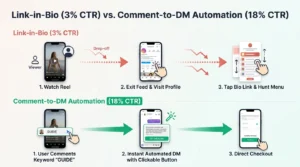
Traditional “link in bio” funnels lose up to 85% of prospects across five friction points: exiting full-screen video, tapping your handle, loading your profile, opening a link tree, and hunting for the right URL. Comment-to-DM automation collapses that path into a single keyword comment that sends an instant private message with a direct checkout button. A HypeAuditor and ManyChat study of 6,000 creators cited in ManyChat’s Instagram comment-to-DM automation guide found that automated accounts achieved up to 30% higher engagement rates and 156% more comments per post (averaging 46 comments vs. 18 for non-automated accounts).
Configure a compliant comment-to-DM workflow using ManyChat’s Instagram Post and Reel Comments trigger documentation:
- Connect a Meta-approved API provider: Use an official partner such as ManyChat or LinkDM built on Meta’s Messenger API for Instagram.
- Bind the trigger to a specific post or Reel: Attach each workflow to an individual post rather than an account-wide rule so the DM matches the exact offer shown.
- Set one distinct keyword plus typo variants: Choose a concrete noun (AUDIT, TEMPLATE, KIT) and add mobile typos (TEMPLAT), avoiding everyday words like “yes” that fire unsolicited DMs.
- Enable rotating public comment replies: Pre-load 4–6 varied public replies (“Just sent the guide to your DMs!”) to double visible comment counts and trigger feed distribution.
- Send a single-button DM immediately: Keep the inbox message under 35 words and attach one native CTA button with UTM parameters.
Material Limitation: Comment-to-DM workflows excel for single-offer campaigns and lead magnets, but suit multi-category store browsing poorly. Keep volume below ~1,000 automated DMs per day on established accounts to respect Meta API rate limits.
2. Master Curiosity-Gap Headlines and Benefit-Driven CTAs
Writing curiosity gap headlines paired with specific, benefit-driven calls to action increases social media click-through rates by opening a cognitive loop that names the tangible reward of clicking while withholding the underlying framework, calculator, or data inside.
Marketers exploring how to get more clicks on social typically commit one of two copy errors: giving away the entire answer inside the caption (removing any reason to click) or using vague commands like “Link in bio to read our new blog” that offer zero concrete value. As Sprout Social’s click-through rate (CTR) guide explains, replacing generic “Click here” phrasing with explicit user outcomes is a primary driver of CTR growth.
| Format | Weak Generic CTA (Low CTR) | High-CTR Curiosity & Benefit CTA | Conversion Trigger |
|---|---|---|---|
| Instagram Reel | “New post on email tips. Link in bio!” | “We deleted 34,000 cold subscribers and revenue rose 22%. Comment CLEAN for our 4-rule filter.” | Counter-intuitive data + named tool |
| LinkedIn Carousel | “Download our 2026 Churn Report.” | “71% of SaaS churn happens before day 14 due to one screen. Grab the 3-minute teardown below.” | Specific failure point + fast proof |
| TikTok Video | “Shop our winter running jackets.” | “Why ‘waterproof’ jackets soak through at mile 4 (and the 180g test proving it). Tap for lab results.” | Problem agitation + verification |
| X Thread | “Here is our free SEO checklist.” | “6 technical SEO fixes that recovered 41,000 monthly clicks in 19 days. Grab the sheet in reply #6.” | Quantified outcome + thread flow |
Apply three copywriting rules to every conversion post:
- Anchor hooks with odd numbers and timeframes: Specific figures (“14 to 290 clicks”, “19 days”, “£42 CPA drop”) stop thumb scrolling by signaling measured evidence over generic claims.
- Name the destination as a tangible tool: Swap abstract nouns (“article”, “website”) for utility nouns (“ROI calculator”, “sizing matrix”, “swipe file”).
- Add a low-friction micro-modifier: Place “free, no email required” or “takes 60 seconds to copy” beside your CTA to reduce perceived post-click effort.
3. Optimize Instagram Story Link Sticker Placement and Framing
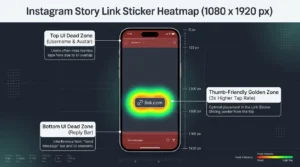
Optimizing Story link sticker placement requires positioning customized link stickers inside the lower-centre thumb zone—between 1,200 and 1,500 pixels from the top of a 1,080 × 1,920 canvas—while framing the sticker with directional cues and warm-up slides.
Mobile ergonomics dictate vertical Story tap rates. According to Overvisual’s 2026 Instagram Story safe zone specifications, a standard 1,080 × 1,920 pixel Story masks the top 155 pixels (profile header) and bottom 155 pixels (reply bar), leaving a centered 1,080 × 1,610 pixel safe area. Stickers dropped in the upper corners or flush against the bottom edge strain one-handed thumb reach or trigger accidental “Send message” taps. Positioning your Link Sticker inside the lower-middle safe zone—1,200 to 1,500 pixels from the top—matches the natural thumb arc and avoids side-edge navigation zones.
Pair ergonomic coordinates with a three-frame Story sequence—one of the most dependable social media CTR hacks for creators and e-commerce brands:
- Frame 1 — Micro-Commitment Poll: Start with a two-option Poll sticker diagnosing a pain point (“Are your Story link taps stuck under 2%?”). Tapping warms up the viewer’s thumb and boosts Story completion.
- Frame 2 — Visual Proof Snapshot: Share a cropped before-and-after chart, product demonstration, or customer result to build anticipation before introducing a link.
- Frame 3 — Framed Custom Link Sticker: Place the Link Sticker in the 1,200–1,500 px Golden Zone, tap “Customize sticker text” to replace the raw URL with a 4-word action phrase (“Get the 2026 CTR Sheet”), and point a visual arrow toward the button.
4. Build Post Social Proof So Users Trust Your Links
Building visible post engagement directly accelerates social proof conversion because scrollers judge link safety and offer quality by existing like and comment counts before clicking, making early interaction velocity essential for both algorithmic distribution and outbound click trust.
Whenever a user sees a post asking them to tap an external link or comment a trigger keyword, they run a split-second trust check. With phishing links and low-value lead magnets common across feeds, a promotional post sitting at 3 likes and zero comments signals high risk. Conversely, strong like and comment counts reassure viewers that peers have already validated the resource. To overcome cold-start hesitation on key campaign posts, marketers often use SoldOutX to increase post credibility with real likes during the first hour after publishing, pairing that foundational social proof with organic community replies and DM automation.
Convert post credibility into sustained link clicks with three practices:
- Pin two validation comments immediately: Pin one customer result confirming the link’s value and one author comment restating the trigger keyword.
- Align with connected-reach signals: As Head of Instagram Adam Mosseri noted in Hootsuite’s 2026 social media algorithm research, likes remain a primary signal for connected reach (existing followers), pushing conversion posts higher in warm feeds.
- Respect commercial boundaries: Visible engagement establishes initial trust so users stop scrolling, but cannot fix weak offer alignment or slow landing pages.
5. A/B Test Visual Thumbnails and Carousel Final Slides
Systematic A/B testing of video thumbnails, carousel final slides, and post-to-page message match enables marketers to improve link clicks social campaigns deliver by isolating the exact visual framing that maximizes both outbound taps and landing page conversions.
Multi-slide carousels generate the highest organic engagement on Instagram at 4.2% average engagement—reaching up to 5.5% in education and nonprofits—according to Hootsuite’s 2026 social media industry benchmarks. Every swipe deepens viewer commitment, yet most brands waste the final slide on a generic “Follow for more” screen instead of a dedicated conversion prompt.
Run a structured three-part testing and continuity workflow:
- A/B test Slide 1 and video thumbnails: Keep caption copy identical while testing a Data-Chart Thumbnail (an annotated before/after graph) against a Product-in-Use Thumbnail. Track 3-second thumb-stop rate alongside outbound CTR over 72 hours.
- Mock up the asset on the final carousel slide: Show a tangible preview of your template, calculator, or product bundle on the final slide paired with a clear trigger (“Comment BUNDLE for the direct 20% off checkout link”).
- Enforce Landing Page Continuity (Message Match): High CTR is wasted if visitors bounce after clicking. As Unbounce’s landing page message match guide shows, matching your landing page headline, hero visual, and colour palette word-for-word to the social post reassures mobile visitors they are in the right place and prevents post-click drop-off.
Frequently Asked Questions
1. What is a good click-through rate (CTR) on social media in 2026?
A good social media click-through rate in 2026 ranges from 1.2% to 2.8% across paid and organic feed placements, while optimized Instagram Story link stickers achieve 3% to 5% and automated comment-to-DM funnels regularly reach 8% to 18% effective CTR.
2. Do links in captions hurt reach on Instagram, TikTok, and LinkedIn?
Yes, placing external links directly inside social media captions or post bodies reduces organic reach by 25% to 50% because platform algorithms deprioritize posts that end user sessions, making comment-to-DM triggers, first-comment links, and native Story stickers far more effective.
3. How does comment-to-DM automation increase link clicks?
Comment-to-DM automation increases link clicks by replacing a high-friction five-step profile bio search with a one-word comment trigger that sends a clickable CTA button straight to the user’s inbox while simultaneously boosting algorithmic post reach through higher comment velocity.
4. Where should you place the Link Sticker on Instagram Stories for maximum taps?
Place the Instagram Story Link Sticker in the centre-lower third of the screen—specifically 1,200 to 1,500 pixels from the top of a 1,080 × 1,920 canvas—inside the natural thumb-reach zone and clear of the 155-pixel top and bottom UI margins.
5. Why does post engagement affect click-through conversion rates?
Post engagement directly affects click-through conversion rates because visible likes, shares, and active comments act as immediate social proof that reassures sceptical scrollers a link is safe and valuable, while signaling platform algorithms to distribute the post to warmer audiences.
Final Verdict
Increasing your social media click-through rate in 2026 requires aligning with platform retention algorithms rather than fighting them: remove raw outbound URLs from feed posts, deploy comment-to-DM automation, position Story link stickers inside the thumb zone, and back posts with visible social proof.
Audit your last ten promotional posts using the (Total Clicks / Total Impressions) * 100 formula to pinpoint whether your bottleneck is suppressed reach, weak curiosity-gap copy, or bio-link friction. Replace your next “link in bio” prompt with a single-keyword DM flow, place custom Story stickers inside the 1,200–1,500 pixel Golden Zone, and enforce strict message match on your destination landing page. For more conversion playbooks and platform benchmarks, explore the latest guides on Social Mention UK.

Discussion