


To rank at the top of Instagram search and Google SERPs in 2026, you must align your @handle, Name field, semantic captions, on-screen OCR video text, spoken audio, and custom Alt Text with high profile authority and post save velocity. This instagram seo guide breaks down the exact technical ranking signals, character limits, and indexing rules that control organic discovery across both Meta’s internal search engine and external web search results.
Quick Summary Box
Instagram SEO in 2026 operates as a multimodal search engine that reads keywords across seven distinct profile and post placements while using follower authority and post saves as competitive tie-breakers. Moreover, because Google and Bing now index public posts and Reels from professional Instagram accounts, optimizing your content captures high-intent traffic from both social searchers and web searchers simultaneously.
According to the Hootsuite Instagram SEO & Search Ranking Study, Gen Z and Millennial audiences now rely on Instagram and TikTok as primary search engines for product discovery, local service vetting, and tutorial queries ahead of traditional directory searches. Capturing this demand requires placing target keywords where Meta’s retrieval algorithms assign the highest weight.
7-Point Instagram SEO Placement & Priority Matrix
| Placement Area | Character / Technical Limit | Priority Weight | Practical Optimization Example |
|---|---|---|---|
| 1. @Handle (Username) | 30 characters max | Critical (Tier 1) | @londonweddingphoto or @alex_seo_coach |
| 2. Profile Name Field | 64 characters max | Critical (Tier 1) | Maya Lin — London Wedding Photographer |
| 3. Bio Description & Category | 150 characters max | High (Tier 2) | Documentary wedding photography across London & Surrey. Book 2026/27 dates |
| 4. First-Line Caption Text | 2,200 chars total (125 visible before fold) | High (Tier 2) | Looking for a natural London wedding photographer? Here are 5 timeless venues… |
| 5. On-Screen Video Text (OCR) | Native Instagram text layers preferred | Medium-High (Tier 2) | Text hook displayed for the first 3–5 seconds: London Wedding Photography Pricing Guide |
| 6. Spoken Audio (ASR Transcript) | Clear speech within first 10 seconds | Medium (Tier 3) | Saying the exact target phrase aloud within your opening sentence hook |
| 7. Custom Alt Text | 100 characters recommended (up to 500 max) | Medium (Tier 3) | Bride and groom portrait outside St Paul’s Cathedral by London wedding photographer |
| Rank Order | Instagram SEO Ranking Signal | Search Weight | Technical Execution Rule |
|---|---|---|---|
| #1 | Handle & Name Field Keywords | 100% (Highest Weight) | Include your core niche or location keyword in @username (30 chars) and Name Field (64 chars). |
| #2 | Follower & Save Authority | 90% (The Tie-Breaker) | Total follower authority and post save velocity break ranking ties between identical keywords. |
| #3 | First-Line Caption Keywords | 85% (High Weight) | Front-load primary keywords in the first 125 characters (acts as your Google SERP title link). |
| #4 | On-Screen OCR Video Text | 75% (Medium-High Weight) | Place native text overlays in the center 4:5 safe zone during the opening 3 to 5 seconds. |
| #5 | Spoken Audio Transcription (ASR) | 65% (Medium Weight) | Speak your target keyword aloud clearly within the first 5 to 10 seconds of video audio. |
| #6 | Custom Alt Text | 60% (Medium Weight) | Add a 100-character descriptive sentence in Advanced Settings > Write Alt Text before publishing. |
How the Instagram Search Engine Ranks Accounts and Reels
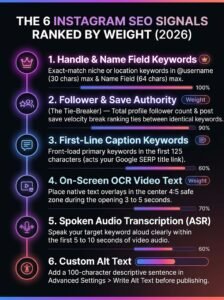
Instagram’s search engine ranks accounts, audio, and Reels by matching the user’s search query against indexed text strings first, then sorting matching candidates by personal interaction history, profile follower authority, and post save ratios. As detailed in Instagram’s official breakdown of how Instagram Search works, every search query triggers a multi-signal ranking pipeline that evaluates text relevance, user activity history, and popularity signals (clicks, likes, saves, shares, and follows).
During candidate retrieval, Meta’s indexing crawlers scan seven distinct data layers across your profile and media:
- Your @Handle and Name field for exact and partial string matches.
- Your 150-character Bio and Professional Category label for entity classification.
- Semantic caption copy, specifically weighting the opening 125 characters before truncation.
- Optical Character Recognition (OCR) layers extracted from on-screen video and carousel text.
- Automated Speech Recognition (ASR) transcripts generated from your spoken audio track.
- Custom Alt Text embedded inside the image or video metadata container.
- Location tags attached to feed posts, carousels, and Reels.
How Google Indexes Public Instagram Posts and Reels in SERPs
Since July 10, 2025, Google and Bing have officially indexed public Reels, carousel posts, and image posts from professional Instagram Business and Creator accounts (provided the account holder is 18 or older and has “Allow public photos and videos to appear in search engine results” enabled in Privacy settings), a shift documented in Kapwing’s creator analysis on Instagram posts in Google Search. When someone searches a commercial or local query on Google such as “best minimalist kitchen remodel ideas” or “Manchester personal trainer for posture”—Google surfaces indexed Instagram Reels and carousels directly in the main SERP and “Short Videos” carousel.
Google generates the clickable SERP title link for an indexed Instagram post directly from the first line of your Instagram caption combined with your Profile Name field. If your first caption line is vague (for example, “New post! Link in bio”), Google cannot match your Reel to high-intent web searches. By front-loading your primary keyword in the first 60 to 100 characters of your caption, you optimize simultaneously for Instagram’s internal search bar and Google Search.
1. Put Your Primary Niche Keyword in Your @Handle and Name Field
Placing your primary niche or service keyword directly into your @handle and 64-character Name field is the single highest-weighted ranking action for appearing at the top of the “Accounts” tab and “For You” search dropdown. When a user types a query into the Instagram search bar, the Instagram search algorithm prioritizes exact-match profile metadata before evaluating individual posts.
Most creators and businesses treat both the @username and the Name field as duplicate places for their brand name. Unless you are an already famous household brand, repeating your brand name wastes your most valuable SEO real estate. Nobody searches for a business name they have never heard of; they search for the solution, service, or niche you provide.
How to Structure Your Handle and Name Field for Maximum Search Weight
Separate your identity from your core searchable category using a clean delimiter such as a vertical pipe (|), bullet (•), or dash (-)
- @Handle Optimization (30-character limit): Keep your handle easy to remember, free of multiple underscores or random numbers, and include a root niche word if available (e.g., @clairebakehouse instead of @claire_b_1994_uk). Avoid changing a well-established handle if you already have strong backlinks or press mentions, as handle changes reset external link equity.
- Name Field Optimization (64-character limit): Follow the [Brand or Personal Name] | [Primary Keyword + Location/Niche] formula.
- Weak Name Field: Studio Verve
- Optimized Name Field: Studio Verve | Austin Interior Designer
- Creator Example: Marcus Vance | B2B LinkedIn & SEO Strategist
Once you update your Name field, maintain consistency for at least 14 to 21 days. Instagram’s entity graph re-indexes profile metadata periodically, and frequent edits within a short window can trigger temporary verification holds or delay search re-ranking.
2. Write Semantic, Keyword-Rich Captions (Keywords vs Hashtags)
Semantic, keyword-rich captions drive up to 3x more organic search discovery than relying on 30 bottom-of-post hashtags because Instagram’s natural language processing (NLP) models evaluate full sentence context and topic relevance rather than isolated tag strings. While hashtags now function primarily as secondary categorization labels, natural keyword phrases inside your caption sentences directly match conversational user queries.
In 2026, user search behavior on Instagram mirrors long-tail Google queries. Moreover, since Instagram introduced a strict 5-hashtag cap per post and Reel to curb spam—as covered in CreatorFlow’s 2026 Instagram Reels & Google Search study—cramming 30 tags at the bottom of a post is obsolete. Users rarely type #fitnessmotivation into the search bar; instead, they search specific phrases like “30 minute dumbbell leg workout at home” or “how to fix lower back rounding on squats”. Instagram’s semantic search engine parses your caption to check whether your post actually answers that specific intent.
Keywords vs. Hashtags: 2026 Performance & Indexing Comparison
| Feature / Signal | Semantic Caption Keywords | Instagram Hashtags (3–5 Targeted) |
|---|---|---|
| Discovery Volume Impact | High (Up to 3x higher search reach) | Low-to-Moderate (Categorization support) |
| How Instagram’s AI Reads It | Evaluates sentence structure, synonyms, entities, and search intent | Treats as a static content bucket label |
| Google SERP Indexing Value | Direct impact—first 125 characters act as the Google meta title and snippet | Zero impact—Google ignores hashtag blocks for ranking |
| Optimal Placement | First sentence (hook) and naturally integrated throughout body paragraphs | End of caption (3 to 5 hyper-specific niche and location tags) |
The 3-Layer Semantic Caption Formula
- The Searchable Hook (Characters 1–125): Include your exact primary keyword phrase within the first sentence. This guarantees both Instagram’s preview snippet and Google’s SERP crawler register your core topic immediately.
- Entity & LSI Body Copy: Expand on the topic using 2 to 4 related semantic keywords (LSI terms) that naturally co-occur with your main topic. For example, if your primary keyword is “sourdough starter troubleshooting”, naturally include semantic entities like hydration ratio, fermentation temperature, discard recipe, and levain build.
- Minimal, High-Signal Hashtags: Replace blocks of 25–30 generic tags with 3 to 5 specific tags that clarify your niche, format, and location (e.g., #LondonWeddingPhotographer #EditorialBride #UKWeddingVenue).
3. Use On-Screen Text and Spoken Keywords in Reels (OCR & Audio Indexing)
Instagram indexes your Reels for search by running Optical Character Recognition (OCR) on your video text overlays and Automated Speech Recognition (ASR) on your spoken audio track to verify topical relevance. When your spoken words, on-screen text hook, and written caption all contain the same target keyword, Instagram assigns a high multimodal confidence score to your video.
Many creators design video hooks that are visually intriguing—such as “Stop doing this!” or “I can’t believe this worked”—without ever naming the actual subject on screen or out loud in the first five seconds. While vague curiosity hooks might work for existing followers browsing their home feed, they fail completely in instagram keyword optimization because the OCR and ASR crawlers have no topic entity to index.
Technical Best Practices for OCR & Audio Search Indexing
- Keep On-Screen Text in the First 3 Seconds: Display a clear, keyword-explicit headline on screen during the opening 3 to 5 seconds of your Reel (e.g., “How to Rank on Instagram Search in 2026”).
- Use Native Instagram Text Layers When Possible: While Meta’s OCR engine reads burned-in text exported from CapCut or Premiere Pro, adding at least your primary headline using Instagram’s native text editor passes clean text metadata directly to the database before visual rendering even occurs.
- Avoid Safe-Zone Cropping and Low Contrast: Place OCR text inside the central 4:5 safe zone, away from the bottom caption overlay and right-side engagement buttons, using high-contrast fonts that computer vision can read without error.
- Speak Your Primary Keyword in the First Sentence: Say your exact target keyword clearly within the first 5 to 10 seconds of your voiceover or talking-head clip. Turn on Instagram’s auto-generated closed captions and manually correct any misspelled industry terms or brand names before hitting publish.
4. Write Custom Alt Text in “Advanced Settings” Before Publishing
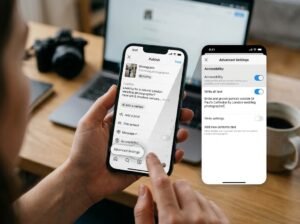
Writing custom Alt Text in Instagram’s “Advanced Settings” menu before publishing replaces vague automated object tags with precise, keyword-rich descriptions that train Instagram’s computer vision AI and Google Image search crawlers on your exact post topic. By default, Instagram uses object-recognition software to generate automatic alt text, which typically reads like a generic list (“May be an image of 1 person, smiling, outdoors”), whereas Dash Social’s technical guide to Instagram Alt Text highlights that crafting a specific, 100-character custom description signals both screen readers and Instagram’s algorithm on the exact focal entity of your post.
Overriding that default description gives you a dedicated 100-to-125-character metadata field to explain who is in the frame, what specific problem or service is depicted, and where it takes place. Custom Alt Text works alongside your broader engagement retention tactics—such as implementing the best ways to increase Instagram Story views fast to keep existing followers interacting daily with your account, which raises your baseline account relevance score across the platform.
| SCREEN 1: NEW POST PUBLISHING MENU | SCREEN 2: WRITE ALT TEXT EDITOR |
|---|---|
| Step 1: Open New Post or Reel and write your caption.
Step 2: Scroll to the very bottom of the menu and tap Advanced settings (or More options). |
Step 3: Under the Accessibility section, tap Write alt text.
Step 4: Enter your keyword-rich description: “Bride and groom portrait outside St Paul’s Cathedral by London wedding photographer” and tap Done. |
CMS Image Upload Specs (Visual 1): File Name: how-to-add-custom-alt-text-instagram-seo.webp | Alt Text: How to add custom Alt Text in Instagram Advanced Settings for SEO
Step-by-Step: How to Add Custom Alt Text to Posts and Reels
- Prepare your feed post, carousel, or Reel and proceed to the final caption and tagging screen.
- Scroll to the bottom of the publishing menu and tap Advanced settings (or More options on select iOS/Android builds).
- Scroll down to the Accessibility header and tap Write alt text.
- Write a concise, natural sentence (under 100–125 characters) that accurately describes the visual content while weaving in your primary or secondary keyword and location if applicable.
- Tap Done (or Save) in the top corner, then publish your post.
Formula for High-Ranking Alt Text (Accessibility + SEO)
[Visual Subject & Action] + [Specific Context/Environment] + [Target Niche Keyword or Location]
- Bad Alt Text (Keyword Stuffing): instagram seo guide how to rank on instagram search instagram algorithm seo tips 2026
- Good Alt Text (Descriptive & Indexed): Social media manager reviewing an Instagram SEO guide checklist and analytics dashboard on a laptop in London
(Note: You can also retrofit custom Alt Text onto your existing top-performing feed posts by tapping the three dots … in the top right of any published post, selecting Edit, and tapping Edit Alt Text in the bottom-right corner of the image.)
5. Win the Search Tie-Breaker with High Profile Authority and Saves
When multiple Instagram accounts or Reels use the exact same keywords in their Name field, captions, and Alt Text, the Instagram search algorithm breaks the tie by ranking the profile with higher follower authority and stronger post save velocity first. Keyword placement gets your content into the candidate pool, but authority and behavioural signals determine whether you rank #1 or #45.
Consider what happens when a user in New York or London searches “Personal Injury Lawyer”, “Bridal Makeup Artist”, or “Fitness Coach”. Hundreds of local professionals have already put those exact words in their Name field and captions. To prevent low-quality or inactive accounts from cluttering top search slots, Meta’s ranking neural network evaluates two decisive tie-breaker metrics: Account Authority (total follower count, follower growth momentum, and profile tap-through rate) and Content Utility (measured primarily by Saves and Shares per reach).
If your technical keyword setup is complete but you are stuck below competitors with larger audiences, you can strengthen profile authority with SoldOutX followers to establish immediate social proof and pass the algorithm’s account-level trust threshold, while simultaneously working to boost post save signals for top search ranking on your core cornerstone Reels and carousels so Instagram’s ranking model locks your posts into the top search grid.
| Phase | Profile & Search Metrics |
|---|---|
| Before Optimization | A London wedding photographer was not appearing in the top 20 results when brides searched “London Wedding Photographer” on Instagram, despite posting high-resolution portfolio carousels three times a week (900 followers, low post saves). |
| The Optimization | Added the exact keyword “London Wedding Photographer” to her Name field, wrote custom Alt Text on her top 12 portfolio posts, and boosted her profile authority from 900 to 4,500 followers plus 80+ saves per post via SoldOutX. |
| After Optimization (3 Weeks) | Ranked #2 in Instagram Search for “London Wedding Photographer” within 3 weeks, generating 9 inbound wedding bookings directly from organic Instagram search discovery. |
A standard “like” is a passive, half-second reflex that tells Instagram a post was mildly entertaining. A Save, by contrast, is a high-intent bookmarking signal telling the algorithm that the post contains reference-grade value worth revisiting. When an educational carousel or Reel accumulates a high save-to-impression ratio (typically above 2% to 4%) within the first 24 hours of publishing, Instagram classifies that post as an authoritative answer for the keywords found in its caption and OCR text—pushing it to the top of the “Top” and “Reels” search tabs for months after publication.
Frequently Asked Questions
1. How does Instagram SEO work in 2026?
Instagram SEO in 2026 works by matching user search queries against seven indexed text fields—your @handle, Name field, bio, caption text, on-screen OCR video text, spoken audio, and custom Alt Text—before ranking the top results based on follower authority, post saves, and user interaction history.
2. Are keywords more important than hashtags on Instagram now?
Yes, natural semantic keywords in your caption and Name field are significantly more important than hashtags in 2026. Caption keywords drive up to 3x more discovery than 30 hashtags because Instagram’s AI evaluates full sentence context and Google indexes caption text directly in web search results.
3. How do you add custom Alt Text to an Instagram post or Reel?
To add custom Alt Text on Instagram, reach the final publishing screen, scroll to the bottom, tap Advanced settings, select Write alt text under the Accessibility section, and enter a clear 100-character description containing your primary keyword and visual context before tapping Done.
4. Does Instagram read text inside your video and spoken audio?
Yes, Instagram uses Optical Character Recognition (OCR) to read on-screen text overlays and Automated Speech Recognition (ASR) to transcribe your spoken audio. Naming and displaying your target keyword within the first five seconds of a Reel helps Instagram categorize and rank your video accurately.
5. Why do accounts with more followers and saves rank higher in Instagram search?
When dozens of accounts use the exact same keywords in their Name fields and captions, Instagram uses profile follower count and post save velocity as authority tie-breakers. Higher followers and saves signal trustworthiness and content utility, prompting the algorithm to rank those profiles first.
Final Verdict
Ranking at the top of Instagram search and Google’s indexed social results in 2026 comes down to combining structured metadata with undeniable authority signals. Start today by auditing your @handle and 64-character Name field to ensure your primary niche or local service keyword is explicitly stated. Next, align every new post across all multimodal layers—front-loading your main keyword in the first 125 characters of your caption, displaying it in your opening 3-second on-screen OCR text, speaking it aloud in your audio hook, and embedding descriptive custom Alt Text in Advanced Settings. Finally, back up your on-page technical optimization with consistent follower authority and high post save velocity so your profile wins the algorithmic tie-breaker in competitive niches.

Discussion