


An Instagram Story viewer is a web-based tool that allows you to watch and download public Instagram Stories, Highlights, and profile posts without logging into an Instagram account. Because the viewer retrieves media through external proxy servers rather than your personal app session, your username never appears on the creator’s viewer list—enabling 100% anonymous browsing.
Whether you are a digital marketer auditing a competitor’s daily campaign cadence, a PR specialist vetting creator partnerships, or an everyday user who wants to view a public update without leaving a trace, understanding how these tools work is critical. Inside the native Instagram app, every tap on a Story ring is tied to your authenticated User ID and logged for the account owner to inspect. Third-party viewers remove that attribution entirely, provided you know which tools are genuine and which technical boundaries cannot be crossed.
In this complete 2026 guide, we explain the exact mechanics behind anonymous Instagram Story viewers, compare the six most reliable no-login tools tested by our editorial team, break down Instagram’s 50-view native ranking algorithm, and outline the security rules you must follow to keep your data safe.
Key Takeaways: Quick Summary
- Zero Login Required for Public Profiles: Legitimate Instagram Story viewers only need a public @username or profile URL. You never need to enter your Instagram password or connect an account.
- Private Accounts Are Strictly Inaccessible: No browser-based viewer can bypass Meta’s server authentication for private profiles. Websites asking for logins, human verification surveys, or payment to “unlock” private Stories are phishing traps.
- Full Access to Highlights and Reels: Top-tier anonymous viewers also function as an Instagram Highlight viewer and video downloader, letting you view permanent Story collections and public Reels in original MP4 or JPG resolution.
- The 50-View Native Rule: When watching Stories inside the official Instagram app, the viewer list is sorted in reverse-chronological order until a Story reaches 50 views; above 50 views, Instagram shifts to an engagement-based ranking driven by DMs, profile visits, and likes.
What Is an Instagram Story Viewer and How Does It Work?
An Instagram Story viewer is either a third-party web application that fetches public Stories anonymously without an account login, or Instagram’s built-in activity log that displays who opened a Story within 48 hours of posting.
When most users search for an Instagram Story viewer online, they are looking for an external, browser-based utility that separates their personal identity from their browsing activity. According to Rival IQ’s Instagram Analytics benchmark data, active brands and creators publish between 7 and 15 Story slides per week to test hooks, run polls, and drive direct link clicks. For agencies and social media managers, viewing a rival brand’s daily Stories from an official company handle immediately reveals your competitive research. An anonymous Story viewer eliminates that visibility.
How Anonymous Story Viewers Work Behind the Scenes (Server-Side Proxies)
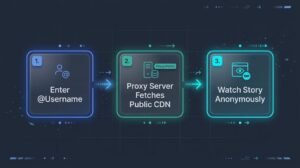
Unlike the official Instagram mobile app—which requires an active session token and logs your user_id the instant a Story frame loads—an anonymous web viewer operates as a server-side intermediary:
- Username Query: You type a public Instagram handle (such as @username) into the web viewer’s search bar.
- Proxy & CDN Request: The viewer’s backend server sends an unauthenticated or proxy-routed request to retrieve the publicly accessible media URLs hosted on Meta’s Content Delivery Network (CDN).
- Client-Side Browser Playback: The tool renders the fetched MP4 video or JPG image directly inside your mobile or desktop browser.
- Complete Anonymity: Because your personal device never communicates with Instagram’s servers via a logged-in account, your handle is never recorded in the creator’s Story viewer list.
Native Instagram App vs. Anonymous Story Viewer: Full Comparison
To help you decide when to use the official app versus a browser-based viewer, this table compares exactly what data is tracked and exposed by each method:
| Feature / Privacy Signal | Official Instagram App (Logged In) | Anonymous Instagram Story Viewer |
|---|---|---|
| Instagram Account Required? | Yes (Mandatory login) | No (100% browser-based, no login) |
| Username Visible to Creator? | Yes (Logged instantly upon opening) | No (Invisible; fetched via proxy server) |
| Viewer Log Retention Window | Visible to creator for up to 48 hours | Never logged under your identity |
| Works on Public Profiles? | Yes | Yes |
| Works on Private Profiles? | Yes (Only if you are an approved follower) | No (Blocked by Meta server authentication) |
| Can View Pinned Highlights? | Yes (Requires logged-in session) | Yes (Via dedicated Highlight viewer tabs) |
| Direct Media Downloading? | No (Requires screenshots or screen recording) | Yes (One-click MP4 video and JPG photo saves) |
| Interactive Stickers (Polls/Quizzes)? | Fully interactive | View-only (Stickers are flattened into the media) |
How to Use an Instagram Profile & Highlight Viewer Step-by-Step
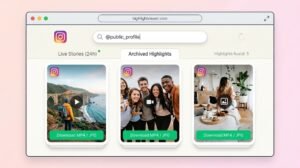
An Instagram Highlight viewer is a built-in feature within anonymous Story viewing tools that lets you open, watch, and save archived Story collections pinned to a public profile without logging in.
While standard Instagram Stories expire 24 hours after publication, creators and businesses archive their most valuable temporary posts—such as product launches, pricing menus, travel diaries, and client testimonials—into permanent Highlights below their bio. Using an anonymous Instagram Profile Viewer lets you inspect both live 24-hour Stories and permanent Highlights in three steps:
- Verify the Public Username: Locate the exact Instagram handle of the public account you want to inspect, making sure to include any periods, numbers, or underscores.
- Enter the Handle into a No-Login Viewer: Open a verified web viewer in your browser (such as InSnoop, Mollygram, or InstaNavigation), paste the username into the input bar, and press Search.
- Browse Live Stories or Highlights and Download: Click the Stories tab to watch active uploads posted within the last 24 hours, or switch to the Highlights tab to browse archived folders. To save a slide for offline reference or campaign mood boards, click the Download button beneath the media file.
(Editor’s Tip: Understanding why audiences engage differently with disappearing 24-hour Stories compared to permanent feed posts is crucial for content strategy. Read our deep dive into why real-time content feels different from recorded video to see how urgency drives viewer psychology.)
What Are the Key Benefits of Using an Anonymous Story Viewer?
Using a browser-based Instagram Story viewer provides four practical advantages for everyday users, researchers, and digital marketers:
- Uncompromised Browsing Privacy: You can check updates from public figures, former connections, or industry peers without triggering an awkward viewer notification or accidental tap-reaction.
- Discreet Competitor & Influencer Auditing: Marketing teams and PR agencies can monitor a competitor’s daily Story frequency, promotional codes, and creator sponsorships without exposing their corporate Instagram handle.
- Account-Free Convenience: If you have deactivated your personal Instagram profile for a digital detox—or if you want to inspect a public profile on a work computer where you aren’t logged into social media—browser viewers work instantly.
- High-Resolution Media Archiving: Built-in download buttons allow social media managers to save clean, watermark-free MP4 and JPG references of public Stories and Highlights before they vanish after 24 hours.
The 6 Best Instagram Story Viewer Tools in 2026 (Tested & Ranked)
The best anonymous Instagram Story viewers in 2026 are InSnoop, Mollygram, InstaNavigation, StorySaver.net, Anon Stories, and FollowSpy.
Because Meta regularly updates its server rate limits and public API protections, many low-quality viewers suffer from broken proxy pools, slow loading speeds, or intrusive pop-up ads. Our editorial team evaluated dozens of web viewers against four strict benchmarks: zero login requirement, proxy fetch speed, Highlight and download reliability, and browser safety.
| Rank & Tool Name | Best Use Case | Pricing | Supports Highlights & Downloads? | Login Required? |
|---|---|---|---|---|
| 1. InSnoop | Fast, reliable public Story & Highlight viewing | 100% Free | Yes (MP4 Videos & JPG Photos) | No |
| 2. Mollygram | High-definition viewing & all-in-one profile checks | 100% Free | Yes (Stories, Highlights, Reels, Grid) | No |
| 3. InstaNavigation | Smooth cross-device browsing on mobile & desktop | 100% Free | Yes (Stories, Highlights, Posts) | No |
| 4. StorySaver.net | Instant one-click Story & Highlight downloading | 100% Free | Yes (Direct media archiver) | No |
| 5. Anon Stories | Lightweight backup viewer during peak traffic hours | 100% Free | Yes (Multi-resolution downloads) | No |
| 6. FollowSpy / RecentFollow | Pairing anonymous Story checks with follower tracking | Freemium / Paid | Yes (Paid plan required for full playback) | No |

1. InSnoop — Best Overall for Fast Anonymous Viewing
InSnoop is a streamlined, browser-based Instagram Story viewer engineered to keep your identity completely separated from your viewing activity. As documented in our comprehensive InSnoop Anonymous Instagram Story Viewer review, the tool excels at rapid username lookups without forcing users through registration walls.
- Standout Features: Fetches active 24-hour Stories and permanent Highlights in seconds, provides one-click local downloads, and never asks for Instagram credentials.
- Limitations: Because it relies on public proxy rotation, heavy traffic spikes can occasionally cause minor cache delays. Using a standard ad-blocker on mobile browsers ensures the cleanest experience.
2. Mollygram — Best for High-Resolution Profile & Story Browsing
Mollygram has established itself in 2026 as a versatile incognito viewer that handles far more than temporary 24-hour posts. In our hands-on Mollygram Review 2026, we found its media player noticeably sharper than older scraper sites.
- Standout Features: Lets you view and save public Stories, archived Highlights, carousel feed posts, and Reels in original quality directly from Safari, Chrome, or Edge.
- Limitations: Strictly bound by public profile permissions—switching an account to private immediately blocks Mollygram from fetching new slides.
3. InstaNavigation — Best for Cross-Device Reliability
InstaNavigation is one of the longest-standing anonymous Instagram viewers on the web. It pairs a simple username search bar with basic public profile statistics, including post counts and follower totals.
- Standout Features: Zero account registration, reliable desktop and smartphone browser compatibility, and separate tabs for Stories, Highlights, and recent feed uploads.
- Limitations: Accounts with more than 25 active video Stories in a single 24-hour window can take an extra few seconds to buffer.
4. StorySaver.net — Best Dedicated Story & Highlight Downloader
While most tools prioritise in-browser streaming, StorySaver.net is built specifically for users whose primary goal is downloading a public Story or Highlight directly to their camera roll or desktop drive.
- Standout Features: Ultra-clean interface—paste the handle, preview the active thumbnails, and tap “Save as Video” or “Save as Photo.”
- Limitations: Does not display full profile grids, comments, or follower analytics.
5. Anon Stories — Best Lightweight Backup Viewer
When major proxy viewers hit temporary rate limits from Meta’s servers, Anon Stories serves as a dependable, fast-loading alternative.
- Standout Features: No login prompts, quick switching between live Stories and older Highlight folders, and clean mobile formatting.
- Limitations: Fewer auxiliary profile metrics than Mollygram or InstaNavigation.
6. FollowSpy & RecentFollow — Best for Story Viewing + Follower Tracking
Unlike pure free viewers, FollowSpy and RecentFollow combine an anonymous Instagram Story viewer with a chronological follower/following tracker.
- Standout Features: Displays exact upload timestamps for every Story slide (e.g., 2h ago or 19h ago), tracks recent follows and unfollows in chronological order, and works in any browser without installing an app.
- Limitations: While free users can preview whether a public account currently has live Stories and check basic stats, watching and downloading full Story media on FollowSpy requires a paid subscription.
How Can You Watch Instagram Stories Anonymously Without a Third-Party Tool?
If you prefer not to use an external browser tool, there are three native methods to hide your view inside the official Instagram app—though each carries strict limitations in 2026:
- The Airplane Mode Method: Open the Instagram app and wait 10–15 seconds on your home feed so the app pre-caches the first few Stories in your top tray. Turn on Airplane Mode (disabling both Wi-Fi and cellular data), tap the target Story to watch it, and force-close the Instagram app completely before reconnecting to the internet. Caveat: Instagram only pre-loads a few slides at a time, so long multi-video Stories often fail to play offline.
- The Half-Swipe Adjacent Peek: Tap the Story immediately to the left or right of the person whose Story you want to see. Hold your finger on the screen and slowly drag halfway toward the target Story without lifting your finger. This lets you inspect the static first frame without logging a view, but video audio will not play and you cannot view subsequent slides.
- A Secondary Burner (“Finsta”) Account: Watching from an unlinked secondary account hides your real name, though the secondary handle will still appear in the creator’s viewer list.
How Does the Instagram Story Viewer Order Work in 2026? (The 50-View Rule)
Instagram orders your native Story viewer list in reverse-chronological order until your Story reaches 50 views; once a Story exceeds 50 views, the algorithm switches to an engagement-based ranking that places the accounts you interact with most at the top.
A huge percentage of users searching for “Instagram Story viewer” are trying to decode why specific people always appear at the top of their native viewer list. Contrary to popular social media rumours, top placement does not automatically mean someone is stalking your profile. Instagram uses a two-tier ranking mechanism:
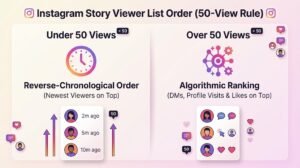
Tier 1: Under 50 Views (Reverse-Chronological Sorting)
When your Story has between 1 and ~50 views, the list is sorted strictly by recency. The most recent person to open your Story sits at the very top, while the first viewer sits at the bottom.
Tier 2: Over 50 Views (Algorithmic Relationship Ranking)
Once a Story passes roughly 50 views, Instagram shifts to machine-learning ranking signals based on mutual closeness. The accounts pushed to the top of your list are determined by three weighted factors:
- Direct Message (DM) Frequency: Users you regularly message, reply to, or send Reels to via DM are weighted heaviest.
- Reciprocal Engagement: Accounts whose posts you like, comment on, or save—and who frequently tap heart reactions or interactive stickers on your Stories.
- Profile Searches & Viewing Habit: How often you type their username into the search bar or visit their profile grid directly. Because the algorithm measures two-way interest, checking someone else’s profile frequently will actually push their name to the top of your own Story viewer list when they watch your post.
Safety, Privacy & Legal Best Practices When Using a Story Viewer
While using an anonymous Instagram Story viewer is legal for browsing public web content, third-party tool directories are littered with copycat scam sites. Follow these three security rules every time you use a viewer:
1. Never Enter Your Instagram Credentials
Legitimate anonymous Story viewers retrieve public data through their own proxy infrastructure. They never require your Instagram username, password, or two-factor authentication code. If a site prompts you to log in or connect your account, close the tab immediately. Giving credentials to third-party scrapers compromises your account security and breaches Instagram’s Official Terms of Use, which can lead to permanent account suspension.
2. Never Fall for “Private Account Viewer” Scams
When an Instagram profile is set to Private, Meta locks media access behind server-side authentication tokens restricted to approved followers. No external website can bypass this encryption. Websites advertising a “Private Instagram Story Viewer” exist solely to harvest passwords, push malware downloads, or trap users in endless affiliate survey loops.
3. Respect Creator Copyright and UK Data Scraping Standards
Every photo and video uploaded to Instagram Stories remains the copyrighted property of the creator who posted it. While downloading a public Story for personal offline viewing or internal agency benchmarking is common practice, you must never republish, monetise, or claim someone else’s content as your own. Furthermore, UK marketing agencies and businesses conducting systematic social media research should ensure their practices align with the UK Information Commissioner’s Office (ICO) joint guidance on data scraping and privacy protection.
Beyond Story Viewing: How to Build Your Own Instagram Authority
Studying public Stories and Highlights anonymously is one of the fastest ways to reverse-engineer how leading creators hook viewers in the first three seconds, structure multi-slide narratives, and drive conversions.
Once you are ready to apply those insights to your own brand or creator profile, pairing consistent content output with strong social proof accelerates your growth:
- Automate Your Content Workflow: If writing daily hooks, captions, and Story scripts takes too much time, see our tested comparison of the 6 Best AI Social Media Post Generators in 2026 to scale your output without losing brand voice.
- Strengthen Your Profile Credibility Safely: If you are comparing third-party growth services to boost initial social proof on a new campaign, always verify retention rates and delivery safety first. Explore our independent, hands-on editorial guides—including the 6 Best Sites to Buy Instagram Followers in 2026, the 8 Best Sites to Buy Instagram Likes Without Drops, and our detailed BuzzVoice Review 2026—to see which providers deliver gradual, authentic engagement and which ones to avoid.
Frequently Asked Questions (FAQs)
Can I watch Instagram Stories anonymously?
Yes, you can watch public Instagram Stories anonymously by using a no-login browser tool such as InSnoop, Mollygram, or InstaNavigation. Because these services fetch public Stories via external proxy servers without connecting to your Instagram account, your username never appears in the poster’s viewer list.
Can someone tell if you viewed their Instagram Story?
If you open a Story while logged into the official Instagram app or Instagram.com, yes—your username is immediately logged and displayed to the account owner for up to 48 hours. However, if you view a public Story using an anonymous third-party Story viewer, the creator cannot see that you watched it.
Do Instagram Story viewers work on private accounts?
No. Legitimate Instagram Story viewers only work on public profiles. Private accounts are protected by Meta’s server-level authentication, meaning only approved followers logged into the official app can access their Stories or Highlights. Any website claiming to view private Instagram Stories is a scam.
Does Instagram notify users when you screenshot or download a Story?
As of October 2026, Instagram does not send a notification when someone screenshots a standard public Story, nor can it detect when you download a Story through a third-party web viewer. Because browser-based downloading occurs entirely outside the official Instagram app, no user telemetry or alert is ever sent to the creator.
How long can you see who viewed your Instagram Story?
Although an Instagram Story disappears from public view after 24 hours, the account owner can still check their complete viewer list for up to 48 hours after posting by opening their Story Archive in the Instagram app. Once 48 hours have passed, individual viewer usernames are permanently hidden, leaving only aggregate reach metrics in Instagram Insights.
Does viewing someone’s profile move you up their Story viewer list?
Yes. Once an Instagram Story passes approximately 50 views, the viewer list switches from reverse-chronological order to an algorithmic ranking based on relationship signals. Frequent profile visits, direct messages, Story replies, and post likes all signal closeness, pushing that account higher on the viewer list.
