

Quick Summary Box
To increase Instagram Story views fast, let all active Stories expire for 24 hours to clear completion penalties, then post a single high-contrast frame featuring an interactive two-option Poll Sticker. This forces Instagram’s ranking algorithm to push your profile ring back to the front of followers’ Story trays within 48 hours.
When your Story reach suddenly stalls, posting more slides only accelerates the decline. According to Later’s Instagram Stories Reach & Retention Report, sequence length and first-frame interaction dictate whether your profile bubble sits in the first five visible slots of a follower’s mobile screen or gets buried twenty swipes deep. Before overhauling your content calendar, benchmark your current first-frame reach rate against industry standards by follower tier.
Healthy Instagram Story View Rate Benchmark Table
| Follower Tier | Average First-Frame View Rate | High-Performing View Rate (Top 25%) | Optimal Daily Frame Count | Primary Retention Lever |
|---|---|---|---|---|
| Nano Creators (1K – 10K) | 7.0% – 10.5% | 12.0% – 18.0%+ | 3 – 5 frames | Slide 1 Poll Stickers & Direct Replies |
| Micro Creators (10K – 50K) | 4.5% – 7.0% | 8.5% – 12.0% | 3 – 7 frames | 24-Hour Expiration Reset & Question Boxes |
| Mid-Tier Creators (50K – 200K) | 3.0% – 5.0% | 6.0% – 9.0% | 4 – 7 frames | Close Friends Green Ring Segmentation |
| Macro Creators (200K+) | 1.8% – 3.5% | 4.5% – 6.5% | 3 – 6 frames | Feed-to-Story Teasers & Add Yours Chains |
How the Instagram Story Tray Algorithm Ranks Your Profile
Instagram ranks your Story tray position using three primary machine-learning signals: viewing history, engagement history, and relationship closeness. Accounts that generate frequent sticker taps, direct message replies, and high completion rates automatically appear first in a follower’s top horizontal Story bar.
As documented in Instagram Ranking Explained by Adam Mosseri, Instagram does not rely on a single chronological feed for Stories. Whenever a user opens the app, the Story ranking classifier gathers every active Story published by followed accounts in the past 24 hours and runs a real-time prediction model. That model calculates the exact probability that the viewer will tap into your Story, watch it to completion, reply via direct message, or swipe away to the next creator. Your horizontal Story tray position—especially whether you land in Positions #1 through #4 that appear on-screen without scrolling—determines up to 80% of your daily Story impressions.
Understanding why Story views dropped requires distinguishing between positive and negative navigation signals tracked in Later’s Instagram Story Analytics Guide. Every action a viewer takes inside your Story sequence updates your account’s algorithmic weight for the next 24 to 72 hours:
| Navigation Signal | Algorithmic Weight | What It Signals to Instagram’s Classifier | Impact on Future Story Tray Position |
|---|---|---|---|
| DM Reply / Reaction | Highest Positive (+5) | Strong personal closeness and two-way conversation | Locks your profile bubble into Positions #1–#3 for that viewer |
| Interactive Sticker Tap | High Positive (+4) | Active viewer participation via Poll, Slider, or Quiz | Boosts distribution to warm followers who skipped recent frames |
| Tap-Back Rate | Moderate Positive (+3) | High visual or informational value prompting a rewatch | Signals high dwell time and strengthens sequence completion score |
| Full Sequence Completion | Moderate Positive (+2) | Pacing and narrative arc held attention to the final frame | Preserves your current Story bar priority for the next upload |
| Tap-Forward Rate | Mild Negative (-1) | Impatience with repetitive or slow-moving slides | Safe if viewers still finish the sequence; harmful if followed by an exit |
| Mid-Sequence Exit / Swipe Away | Severe Negative (-4) | Content fatigue or irrelevant framing | Demotes your profile bubble further right in the horizontal tray |
When you upload 15 to 25 frames across a single day, even loyal followers inevitably swipe out around frame 6 or 7. The classifier registers those mid-sequence exits as negative satisfaction signals. Worse still, when you upload a new Story while older frames are still active, returning viewers must tap through frames they have already seen or start mid-stream, tanking your completion rate and starving your newest slide of fresh reach.
1. Run the 24-Hour Story Expiration Reset
The 24-hour story reset is an algorithmic clearing tactic where you stop posting to Stories until every active slide completely expires. Once your profile ring disappears for a full day, your next upload launches as Slide #1, instantly boosting first-frame completion and sticker engagement rates.
Most UK and US creators inadvertently trap themselves in a rolling Story penalty. Suppose you post four frames at 9:00 AM, three more at 2:00 PM, and two at 8:00 PM, then wake up the next morning at 8:30 AM and post again. Because your afternoon and evening frames from the previous day have not yet expired, your Story ring never fully resets. Viewers who exited your sequence yesterday afternoon are less likely to be served your bubble at the front of their tray today, and your newest morning update sits buried behind yesterday’s stale slides.
Executing a clean 24-hour story reset breaks this decay loop in three deliberate steps:
- Let Every Active Frame Expire Completely: Check your archive clock after publishing your final evening Story and do not upload a single frame—no feed reshares, no text updates, and no link stickers—for at least 24 to 26 hours. Wait until the coloured ring around your profile picture disappears entirely.
- Audit Your Peak Follower Activity Window: While your Story ring is dark, open your Instagram Professional Dashboard, tap Insights > Total Followers, and scroll to Most Active Times (a step emphasised in Rival IQ’s Low Story Views Troubleshooting Guide). Identify the exact one-hour evening window when your UK or US audience peaks—typically between 6:00 PM and 8:00 PM local time.
- Break the Blackout with a Single Interactive Slide: Do not return with a five-slide talking-head recap. Upload one visually arresting image or short 5-second vertical video containing an interactive two-option Poll Sticker, then wait at least two to three hours before posting a second frame.
Why does this work so reliably? When your Story ring reactivates after a complete hiatus, Instagram tests your single slide against a fresh batch of warm followers. Because there is only one frame to watch, nearly 100% of viewers who tap your bubble complete the entire sequence. That near-perfect completion score—combined with early Poll taps—triggers an algorithmic surge that pushes your Story ring leftward across hundreds of additional follower trays over the next 12 hours.
2. Always Put a Low-Friction Poll Sticker on Your Very First Slide
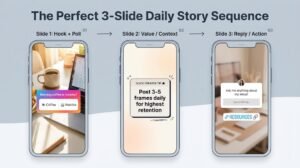
Placing a two-option Poll Sticker or Emoji Slider on your very first Story frame increases reach by 40% or more because Instagram’s poll sticker algorithm treats every one-tap vote as an active engagement signal, immediately expanding distribution to less-active followers.
When learning how to get more story views, creators often make the mistake of saving their story engagement stickers for the final slide of a sequence. By the time you ask a question on Slide 5, 35% to 50% of your initial viewers have already tapped forward or swiped away. Front-loading your interactive element on Slide 1 captures participation during the critical two-second opening window—before viewer drop-off begins, as highlighted in PostFast’s 2026 Instagram Story Views Guide.
Not all story engagement stickers perform equally on Slide 1. High-friction stickers—such as open-ended Question Boxes that require typing a sentence—convert poorly on an opening frame because viewers are scrolling passively. Instead, pair a low-friction binary choice on Slide 1 with a tightly structured 3-to-5 frame daily sequence, which aligns with the 3–7 frame optimal daily cadence found in Later’s Story retention research.
To replicate the 3-Slide Daily Story Sequence shown above and maximise your tap-back rate alongside poll interactions, structure your daily uploads using this exact three-frame blueprint:
- Slide 1 — The Low-Friction Hook + Binary Poll: Post a candid behind-the-scenes workspace, outfit, or lifestyle photo paired with a binary Poll Sticker that takes less than one second to tap (for example, “Morning fuel: Iced Oat Latte ☕ or Matcha 🍵?” or “Which thumbnail pops more: Top or Bottom?”). Place the sticker in the lower-centre thumb zone—never near the far right edge where accidental tap-forwards occur.
- Slide 2 — High-Density Context or Value Tip (Tap-Back Trigger): Deliver the payoff promised on Slide 1 using a concise, high-value tip card or a 7-second video with 35–50 words of clean on-screen text. When viewers tap back from Slide 3 to re-read or screenshot Slide 2, your tap-back rate spikes, telling Instagram’s classifier that your Story sequence warrants higher tray placement.
- Slide 3 — Conversational Conversion (Question Box or Link Sticker): Close the loop on the third and final frame. Now that the viewer has voted on Slide 1 and absorbed value on Slide 2, place your Question Box (“Drop your setup questions below”), DM keyword prompt, or affiliate Link Sticker on Slide 3 where warm intent peaks.
3. Trigger DM Replies Using “Add Yours” and Question Boxes
Direct message replies carry the heaviest ranking weight in Instagram’s Story algorithm. Using Question Boxes, DM keyword prompts, and “Add Yours” stickers converts passive viewers into active inbox conversations, locking your account into the top three Story tray positions.
According to Instagram’s official ranking documentation, “Closeness”—how likely you and a follower are to be connected as friends—is one of the three core pillars of Story tray ordering. On Instagram, nothing signals interpersonal closeness more strongly than a two-way direct message thread. While a Poll Sticker tap registers as a lightweight interaction, a Story reply or Question Box submission creates or refreshes an active thread inside your Instagram inbox. Once a follower messages you from a Story, your profile bubble is virtually guaranteed to sit in Positions #1 to #3 of their Story tray for the next several weeks.
As noted in Rival IQ’s analysis of Instagram Stories performance, organic unprompted DM replies are rare unless you lower the psychological barrier to reaching out. Use these three proven conversational triggers twice a week to flood your inbox with algorithmic closeness signals:
- The Two-Word DM Keyword Trigger: Instead of pasting an external Link Sticker on every frame (which takes users off the Instagram app and ends their viewing session), post a preview of a resource, preset, workout split, or product checklist and write: “Reply GUIDE to this Story and I’ll send the direct link straight to your DMs.” Ten DM replies outperform fifty passive link clicks in Story tray ranking power.
- Opinion-Driven Question Boxes: Avoid vague prompts like “Ask me anything!” which cause decision paralysis. Ask a specific, slightly polarising niche question where followers feel compelled to share their own experience—such as “What is the one skincare product you regret buying this year?” or “Unpopular opinion: Is London creator networking overrated?” When replies roll in, screenshot and share 3 to 4 answers on subsequent slides over the next few hours; followers whose answers you feature will repeatedly check your Stories and tap back.
- Niche “Add Yours” Templates: Launch or join a niche-specific “Add Yours” visual prompt (for example, “Show your desk setup today” or “Your top 3 camera lenses”). Whenever followers tap your “Add Yours” sticker to post their own version, Instagram credits your original frame with a high-intent interaction and displays your handle at the top of the public sticker attribution chain.
4. Use the “Close Friends” Green Ring Effect Strategically
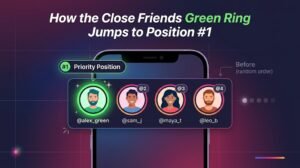
Adding engaged followers and brand peers to your Close Friends list surrounds your profile avatar with a vibrant Close Friends green ring, which Instagram’s interface automatically prioritises at Position #1 at the far left of the Story tray.
Beyond standard algorithmic scoring, Instagram builds explicit user-controlled priority lanes into the home screen. When you publish a Story to your Close Friends list, two powerful mechanics work in your favour simultaneously. First, the visual contrast of the bright Close Friends green ring breaks through “banner blindness” in a sea of identical pink-and-orange gradient rings. Second, Instagram’s Story tray sorting logic elevates unread Close Friends Stories to the very front of the horizontal bar, ahead of standard accounts.
Wait—doesn’t Close Friends limit your reach to only the people on that list? Not if you curate a rotating “VIP Creator & Superfan” list of 150 to 400 of your most active followers, niche peers, and repeat commenters, alongside converting new profile visitors by optimizing your Instagram bio for followers. When those 200 to 400 core followers see your green ring at Position #1, they open, vote, and reply at 3x to 5x the rate of cold followers.
Here is how to deploy the Close Friends green ring without restricting your public reach:
- Curate Your High-Velocity Seed List: Add 150 to 300 accounts who have liked your recent Reels, replied to past Stories, or commented on your grid posts over the past 30 days.
- Publish an Insider Slide to Close Friends First: Share a high-curiosity poll or behind-the-scenes question exclusively to Close Friends (for example, “Close Friends only: Which brand collab concept should I pitch this week—A or B?”).
- Follow Up with a Public Story 30 Minutes Later: Because your seed audience just interacted heavily with your green-ring frame, your overall creator-to-follower engagement velocity spikes, lifting your subsequent public Stories higher in the trays of your broader audience. At the same time, make sure your profile bio funnel is clearly structured so fresh discovery visitors immediately understand why they should tap your active Story ring.
5. Drive Story Tray Priority Through Feed Engagement
Instagram’s relationship classifier links feed interaction directly to Story visibility. Generating strong likes, saves, and comments on your grid posts and Reels signals overall account authority, prompting the algorithm to surface your Story bubble higher for those same users.
Many creators treat Instagram Feed posts and Instagram Stories as two disconnected silos, wondering why their Story reach stagnates even when they use stickers. In reality, Instagram’s ranking architecture evaluates “Information about the person who posted”—including how frequently users have interacted with your account across the entire app over the past few weeks. When a follower likes your carousel or watches your Reel, Instagram updates your pairwise affinity score with that user, increasing the probability that your next Story appears in their top five tray slots.
For UK and US creators preparing a media kit for brand sponsorships, this cross-surface synergy is essential. Influencer marketing managers no longer look at follower count in isolation; they ask for screenshots of your 30-day Story reach and first-frame impression consistency before signing paid deliverables. To strengthen your baseline social proof and accelerate cross-surface ranking signals during high-stakes campaign weeks, you can boost your Instagram visibility with SoldOutX as part of a balanced growth strategy. Pairing organic Story resets with active feed post likes from SoldOutX ensures your main grid maintains strong early engagement velocity, reinforcing the authority signals that keep your profile active across both Feed and Story surfaces.
📊 MINI CASE STUDY — UK Lifestyle Creator (14,000 Followers): 280 to 1,420 Story Views in 48 Hours
• Before (2.0% View Rate): A Manchester-based lifestyle creator with 14,000 followers saw her first-slide Story views collapse to just 280 views per day after habitually uploading 20+ daily frames of unedited reposts and static link slides.
• The 48-Hour Protocol: She paused all Story uploads for a full 24 hours until her profile ring expired completely. The next evening at 7:00 PM GMT, she posted a single Slide 1 behind-the-scenes photo with a two-option Poll Sticker while maintaining consistent grid credibility using SoldOutX feed post likes.
• After (10.1% View Rate): Within 48 hours, her Slide 1 Poll earned 310 votes and her first-frame Story views surged from 280 to 1,420 views—a 5x reach multiplier and a media-kit-ready 10.1% view rate.
To lock in this Feed-to-Story flywheel every week, pair every new grid post or Reel with an intentional “Curiosity Bridge” rather than a lazy full-screen repost:
- Obscure the Payoff on Your Story Reshare: When sharing a new feed post to your Story, cover the main reveal with a sticker or text box that reads “Tap here to see the #1 mistake on Slide 4” so viewers actually tap through to the feed post and leave a like.
- Run a Story Teaser Before Publishing to the Grid: Two hours before dropping a major Reel or carousel, post a single Story Poll asking “Dropping our full UK tax guide for creators at 6 PM—want an early DM reminder? Yes please / Remind me!” Every vote warms up your Story tray position right before your main post goes live.
Frequently Asked Questions
Below are direct, factual answers to the five most common questions UK and US creators ask when diagnosing low Story reach, optimising completion rates, and rebuilding their top Story tray position within 48 hours.
1. Why did my Instagram Story views drop so low?
Your Instagram Story views dropped because posting too many daily frames triggered high exit and swipe-away rates, lowering your completion score. Additionally, uploading new Stories before older frames expire traps your latest updates at the end of a long sequence where fewer followers reach.
2. What percentage of your followers should view your Instagram Stories?
A healthy Instagram Story view rate ranges between 5% and 10% of your total follower count on the first slide for micro and mid-tier creators. Smaller accounts under 10,000 followers often achieve 10% to 15%+, while macro accounts above 200,000 average 2% to 4%.
3. How does the 24-hour Instagram Story reset hack work?
The 24-hour Instagram Story reset works by letting all active Stories expire until your profile ring disappears completely. When you post a single interactive Poll slide 24 hours later, every viewer starts on Frame 1, generating near-100% completion rates that push your Story bubble forward.
4. Does posting too many Stories hurt your view count?
Yes, posting more than 7 to 10 Story frames per day significantly hurts your average view count and completion rate. According to Later’s Instagram Stories Reach & Retention study, viewer retention drops sharply after the fifth frame, increasing mid-sequence exits that penalise future Story tray placement.
5. How does feed post engagement affect your position in the Story bar?
Instagram’s ranking algorithm tracks cross-surface relationship closeness between your profile and each follower. When followers regularly like, comment on, or save your main feed posts and Reels, Instagram increases your affinity score and places your Story ring closer to Position #1 in their Story tray.
Final Verdict
To increase Instagram Story views fast, stop treating Stories like an endless diary and start optimising for first-frame completion and one-tap interaction. Run a 24-hour blackout reset tonight, relaunch tomorrow evening with a single Slide 1 Poll Sticker, cap daily sequences at 3 to 5 frames, and reinforce your profile authority across your main feed to secure Position #1 in your followers’ Story trays.
