

Quick Summary
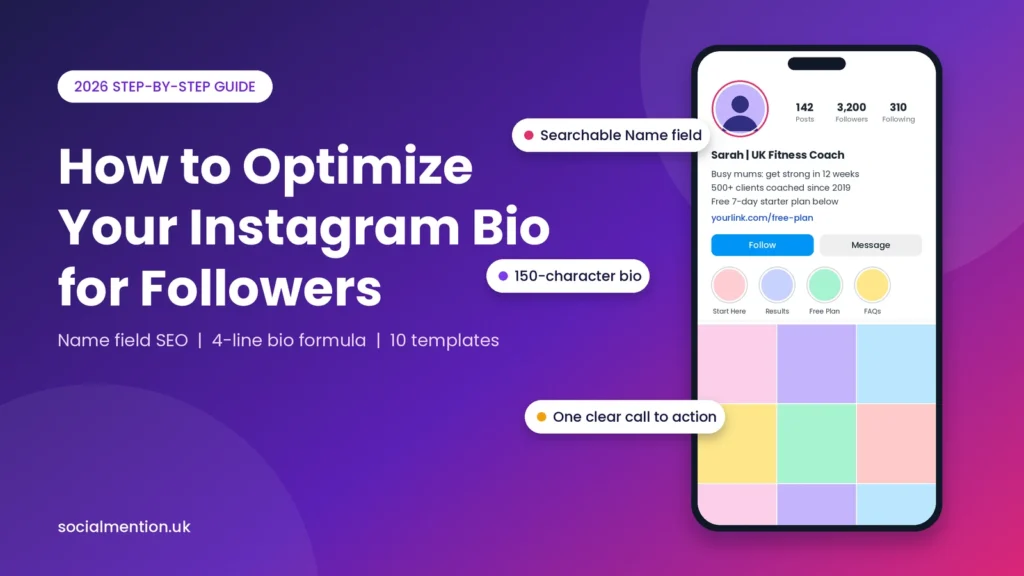
To optimize your Instagram bio for followers, put a searchable keyword in your 30-character Name field, then write three short lines: the transformation you offer, one verifiable proof point, and a single, clear call to action, all within 150 characters.
The 4-line high-converting bio formula
- Name field: your niche keyword beside your name (searchable, up to 30 characters).
- Line 1, transformation: who you help and the result they get.
- Line 2, proof: one number or credential you can back up.
- Line 3, call to action: one next step that matches your link.
These limits follow Hootsuite’s Instagram bio guide, which gives 150 characters for the bio and 30 for the searchable Name field.
Visitors decide whether to follow from a single screen: your photo, Name field, bio, link, Highlights and follower count. The five steps below follow that reading order, and ten templates for creators, coaches and e-commerce brands give you something to adapt straight away.
Step 1: Optimize Your Name Field for Instagram Search SEO (30 Characters)
The Name field is the bold line at the top of your profile. It holds up to 30 characters and is searchable, so adding a niche keyword beside your name helps the right people find you and understand your offer instantly.
Treat it as a keyword label, not just a name. The simplest pattern is Name | Niche + Place, such as “Sarah | UK Fitness Coach” (24 characters) or “Alex | UK Tech Career Coach” (27). Choose the phrase a stranger would type when looking for someone like you, search for it in Instagram yourself, and count every space and separator, because they all use up characters.
Hootsuite lists the Name field as the searchable part of your profile, but Instagram doesn’t publish its ranking rules, so treat a keyword here as improving your odds, not guaranteeing a position. Keep your username for your handle, and keep the Name field readable, because a stuffed string of keywords puts off the people you want to attract.
Step 2: Write Line 1 & 2 Around Audience Transformation
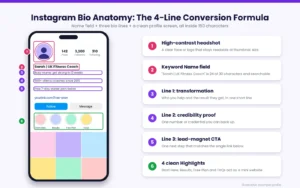
The first two lines of the formula, your Name field and bio line 1, work as a pair: the name says what you are, and the line says what changes for the reader. Lead with the result your audience wants, not your job title.
Use a simple pattern: who you help, the result they get, and the timeframe or method. “Busy mums: get strong in 12 weeks” tells a visitor who it is for and what they gain in 33 characters, while “Fitness | Life | Coffee” tells them nothing. Budget your 150 characters roughly as 50 for line 1, 45 for line 2 and 40 for line 3, remembering that each line break uses one character.
[image: High-converting Instagram bio anatomy diagram with 4-line formula]
If you serve two audiences, pick the one you want more of and cover the other in your Highlights. A specific promise is easier for a visitor to recognise themselves in than a broad one, and you can test a different angle later. Use emojis sparingly, because they count towards the limit and can make a bio harder to read with a screen reader.
Step 3: Add a Quantifiable Credibility Line and Single Actionable Link
Line 2 should carry one quantifiable proof point, such as clients served, years of experience or a recognised credential, and line 3 should ask for one action that matches your link. Specific, checkable claims build more trust than adjectives.
Good proof is specific and true: “500+ clients coached since 2019” or “Level 3 qualified trainer” works when it is accurate, while “Best coach in the UK” gives a visitor nothing to check. If you have no numbers yet, use a credential, a type of client you have worked with or a first-hand result, and update the line as your results grow. Never claim awards, press or figures you cannot show.
End with a verb and a named benefit: “Free CV checklist below” beats “Link in bio”. Instagram lets you add up to five links, but one clear path is easier to follow, so put the link that matches your call to action first and send it to a page where that promise is the headline. Add UTM parameters to the URL so your analytics show which bio changes bring clicks.
Step 4: Structure Story Highlights as a 4-Tab Mini Website
The area visible without scrolling, including your photo, Name field, bio, link and Highlights, works like a landing page. Four clean Story Highlights act as a mini website menu, answering a visitor’s main questions before they decide whether to follow.
Choose four tabs that match those questions: Start Here (who you are and what you offer), Results (proof and testimonials), Free Plan or Offer (your service or lead magnet) and FAQs. Use one colour palette for the covers and one-word names that stay readable under the circle. Later suggests using Highlights for FAQs, roundups and community spotlights, which suits this structure.
[image: Before and after Instagram bio makeover for higher follower conversion]
Then fix the grid below. Pin the posts that explain your offer or prove your results, so the first row reinforces your bio instead of showing whatever you posted last. Archive old Highlights, remove tiles that no longer match your promise, and view the screen on a phone as a stranger would: can you tell who it is for, why to trust it and what to do next within a few seconds?
Step 5: Align Your Bio Claims with Visible Profile Social Proof — Integrate SoldOutX
A strong bio makes a promise, and your visible numbers either support it or undercut it. Aligning claims such as “500+ clients” with a believable follower count and active comments makes the profile feel consistent rather than unfinished.
Visitors read the bio and the numbers together. A coach claiming hundreds of clients on a profile with a few dozen followers invites doubt, while the same line above an established-looking count feels consistent. If you are early in your growth, you can boost your visible follower count with SoldOutX while your content and outreach build real reach, and explore SoldOutX for other profile-growth services. Treat it as a supplement to a clear bio and good content, not a replacement for them.
Mini case study: a London career coach
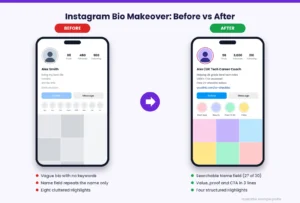
Before: Alex, a London career coach, received around 1,800 profile visits a month but turned only 5% of them into followers. The Name field read “Alex Smith”, the bio had no clear offer or call to action, and the account showed 480 followers.
What changed: The Name field became “Alex | UK Tech Career Coach”. The bio was rewritten with the four-line formula and a free CV checklist as the call to action, and visible followers rose from 480 to 3,000 through SoldOutX.
After: Within 14 days, profile-visit-to-follower conversion rose from 5% to 22.4%.
Results vary by niche, content quality and audience. This is one account’s outcome, not a guarantee.
Comment sections send the same signal. If your posts are strong but quiet, building post credibility with Instagram comments follows the same logic as follower proof. Be realistic about the limits, though. Purchased followers and comments change what visitors see, but they won’t write your offer, replace content people want to engage with, or guarantee how Instagram treats the account, and the platform discourages artificial engagement in its rules. Choose providers carefully, never share your password, and keep replying to real comments and messages.
These ten Instagram bio templates share one structure: a keyword Name field, a transformation line, one proof point and a single call to action. Replace the example details with your own, stay under 150 characters, and only use numbers you can prove.
Bio character counts below include spaces and line breaks, and every Name field fits the 30-character limit. Add one emoji if it suits your brand, and remember that it uses characters too.
Templates for creators
- Fitness creator (bio: 95 characters)
- Name field: Sarah | UK Fitness Coach
- Line 1: Busy mums: get strong in 12 weeks
- Line 2: 500+ clients coached since 2019
- Line 3: Free 7-day starter plan below
- Travel creator (bio: 90 characters)
- Name field: Tom | London Travel Tips
- Line 1: Weekend trips from London under £150
- Line 2: 120+ city guides written
- Line 3: Free packing checklist below
- Food creator (bio: 97 characters)
- Name field: Priya | Easy Vegan Recipes
- Line 1: Weeknight vegan dinners in 20 minutes
- Line 2: 200+ recipes tested at home
- Line 3: Get this week’s meal plan below
- Freelance designer (bio: 85 characters)
- Name field: Maya | Brand Designer UK
- Line 1: Logos for female founders in 10 days
- Line 2: 60+ brands launched
- Line 3: Book a free intro call below
Templates for coaches
- Interview coach (bio: 84 characters)
- Name field: Jordan | UK Interview Coach
- Line 1: Helping grads pass tech interviews
- Line 2: 400+ mock interviews run
- Line 3: Free question bank below
- Business coach (bio: 111 characters)
- Name field: Amira | Small Business Coach
- Line 1: Helping UK founders reach £5k months
- Line 2: Qualified accountant, 10 years in practice
- Line 3: Book a free strategy call below
- Wellbeing coach (bio: 106 characters)
- Name field: Daniel | Stress Coach London
- Line 1: Calmer work weeks without burnout
- Line 2: Accredited coach, 8 years’ experience
- Line 3: Download my free reset guide below
Templates for e-commerce brands
- Skincare brand (bio: 89 characters)
- Name field: Glow Lab | Vegan Skincare
- Line 1: Gentle skincare for sensitive skin
- Line 2: Rated 4.8/5 by 2,000+ customers
- Line 3: Shop bestsellers below
- Jewellery brand (bio: 95 characters)
- Name field: Nora & Co | UK Jewellery
- Line 1: Handmade silver jewellery, made in Birmingham
- Line 2: Free UK delivery over £40
- Line 3: Shop new arrivals below
- Coffee brand (bio: 96 characters)
- Name field: Roast House | UK Coffee Beans
- Line 1: Small-batch coffee, roasted to order
- Line 2: Free delivery on orders over £25
- Line 3: Build your first box below
Frequently Asked Questions
A strong Instagram bio combines a searchable Name field, a transformation line, one proof point and a single call to action within 150 characters. These answers cover writing, keywords, links, conversion problems and how often to update.
1. How do you write an Instagram bio that attracts followers?
State who you help and the result they get, add one specific proof point, then close with a single call to action that matches your link. Put your keyword in the Name field and keep the whole bio within 150 characters.
2. Does putting keywords in your Instagram bio help you show up in search?
The Name field is the part Hootsuite lists as searchable, so put your main keyword there. Keywords in the bio text help visitors understand your offer, but Instagram hasn’t published full ranking rules, so write them for readers first.
3. How many links should you put in your Instagram bio in 2026?
Instagram lets you add up to five links, but one clear path is easier for visitors to follow. Put the link that matches your call to action first, and use the others for secondary pages or a single link-in-bio landing page.
4. Why do people visit my Instagram profile but not follow me?
Usually the profile doesn’t answer three questions quickly: who it is for, why to trust it and what to do next. Check your Name field, proof line, Highlights and pinned posts, and make sure your numbers support your claims.
5. How often should you update your Instagram bio and pinned posts?
Review both monthly, and update them whenever your offer, results or promotions change. Outdated details can confuse visitors, so refresh your proof line after every new milestone, launch or seasonal campaign, and retire pinned posts that no longer match.
Final Verdict
An optimized Instagram bio is a system, not a slogan: a searchable Name field, a transformation line, proof, one call to action, and a profile screen that backs up every claim. Apply the five steps in order and measure the result.
Start with the Name field and first line, because visitors read them first. Then change one element at a time and compare profile visits with new followers in your Instagram insights over two weeks, so you know which edit worked. Pick a template, make it truthful and specific, and publish it today.

Discussion