
 By Oliver Sterling
If you’re trying to start a YouTube channel in the UK, most guides skip the cost of equipment, the real wait before you earn any money, and the HMRC rules you’ll eventually need to follow. As part of Social Mention UK’s ongoing coverage of the creator economy, here’s a complete and honest step-by-step guide to getting set up.
Nearly every adult in the UK is already watching YouTube. Ofcom’s Online Nation 2025 report puts adult reach at 94%, the highest of any platform it measures, with average daily use running to 51 minutes. That’s the audience waiting on the other side of the upload button.
Most “how to start a YouTube channel” guides stop at the setup screen. They walk you through picking a handle and uploading a banner, then leave you to work out everything that actually determines whether a channel survives past month three: what to film, what it costs, how long monetisation realistically takes, and what HMRC expects once the ad revenue starts landing.
This guide covers it all in order, so you’re not piecing it together from six different tabs. By the end, you’ll have a channel that’s set up properly, a niche you can actually sustain, and a clear picture of the money side, both what you might earn and what you owe. Start with the account.
How Do I Start a YouTube Channel in the UK?
The short version: sign in with a Google account, create a channel, choose a handle, add branding, then publish your first video. Each of those steps has a few UK-specific decisions worth getting right the first time, covered below.
- Sign in to (or create) a Google account
- Go to YouTube and select “Create a channel”
- Choose a channel name and @handle
- Add a profile picture and banner
- Fill in the About section
- Verify your phone number in YouTube Studio
- Upload your first video
That’s the mechanical process. The decisions that matter more sit inside each step, so let’s go through them properly.
Setting Up Your YouTube Channel Step by Step
-
Google Account and Brand Account
Every YouTube channel setup UK creators go through starts with a Google account. You can create a channel under your personal account or, better yet, set up a Brand Account for anything beyond a personal vlog. A Brand Account separates the channel from your personal Google identity, lets you add managers later without sharing your login, and makes the channel easier to hand over or sell if the project grows into a business.
-
Choosing Your YouTube Handle UK Creators Can Actually Find
Your handle is the @name that appears in comments, search, and your channel URL. Keep it short, easy to spell out loud, and consistent with your Instagram or TikTok username if you have one. Availability gets tighter every year, so check your first three choices before you commit to a channel name built around one of them.
-
YouTube Channel Name Ideas UK Creators Should Consider
The name and the handle don’t have to match exactly, but they should be close. Avoid anything that pins you to one format (“VlogsWithSarah”) if you might branch into tutorials or reviews later. Names built around a topic or a clear personal brand tend to age better than names built around a trend.
-
Profile Picture and YouTube Banner Size UK Channels Need
Your profile picture displays at 800 x 800 pixels. The channel banner needs to be 2048 x 1152 pixels to display correctly across desktop, tablet and TV, though YouTube’s own channel branding guidelines put the “safe area” for text and logos at roughly 800 x 800 pixels, so keep your logo and any text centred.
YouTube’s branding tips page is also worth a look before designing anything, since it shows real examples of channels using the banner space well. A banner stretched from a phone screenshot is one of the fastest ways to look unfinished before anyone’s watched a single video.
YouTube About Section Tips
The About section is where new visitors decide whether to subscribe. Lead with what the channel is actually for, not a biography. One clear sentence on the topic, one on upload schedule, then contact details if you’re open to brand work.
Keep it updated as the channel’s focus sharpens, because a stale About section undersells channels that have grown well past their first few videos.
What Is the Best Niche for YouTube UK Creators Should Pick?
There’s no single best niche for YouTube UK audiences to respond to, because the right answer depends on what you’ll still want to film in a year. That said, some categories are more forgiving for beginners because competition is thinner and search demand is steady rather than trend-dependent: local reviews and guides, UK-specific personal finance, home improvement and DIY, and niche hobby tutorials all tend to reward consistency faster than broad entertainment or gaming, where established channels dominate search results.
Search Reddit’s r/NewTubers for more than a day, and you’ll see the same question resurface on repeat: best YouTube niche UK low competition. The honest answer is that low-competition niches shift constantly, so the more reliable filter is picking a topic with a UK-specific angle a bigger, US-heavy channel hasn’t bothered to cover. A generic “budgeting tips” channel competes globally. A channel on “budgeting on Universal Credit” competes with almost nobody.
Do I Need Equipment to Start a YouTube Channel UK Beginners Actually Use?
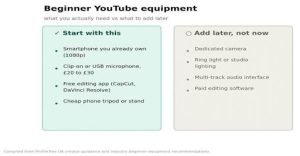
No. A modern smartphone shooting in 1080p is enough quality for a beginner channel, and the account setup itself costs nothing beyond an internet connection. Viewers abandon videos with poor audio far faster than videos with average visuals, so if you’re spending anywhere, spend on a clip-on or USB microphone before a camera upgrade.
This is the other question that never stops coming up on creator forums: what equipment do I need for a YouTube UK beginner, usually followed by how to start a YouTube channel UK with no money. The realistic starter kit is a smartphone you already own, free editing software such as CapCut or DaVinci Resolve, and a £20 to £30 microphone.
Everything past that, ring lights, dedicated cameras, multi-track audio, is worth adding once a channel has proven it’s going somewhere, not before.
YouTube Studio Setup UK Creators Shouldn’t Skip
YouTube Studio is where channel management actually happens: analytics, comment moderation, thumbnail uploads, and monetisation status all live here. Before uploading anything, verify your phone number (required to unlock features like custom thumbnails and longer uploads), set your default video privacy, and turn on two-step verification.
Two-step verification isn’t optional if you’re planning to link an AdSense account later, since it’s a hard requirement laid out in YouTube’s own Partner Programme eligibility guide.
First YouTube Video Tips UK Creators Get Wrong
Don’t wait for the “perfect” first video. Channels that publish something imperfect and adjust based on real audience data outperform channels stuck in pre-production for months.
Two things matter more than polish on video one: a clear title and thumbnail that accurately describe the content, and the first fifteen seconds, which is where most viewers decide whether to stay. Script that opening even if you film everything else off the cuff.
How Long Does It Take to Monetise a YouTube Channel in the UK?
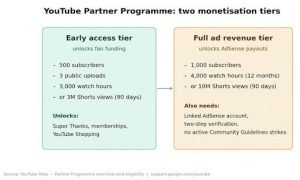
This is one of the most searched questions among new UK creators, and the honest answer is that it depends entirely on niche, upload frequency and watch time, not just subscriber count. According to YouTube’s own Partner Programme eligibility page, the programme now runs on two tiers. An early access tier unlocks at 500 subscribers, 3 public uploads, and either 3,000 watch hours or 3 million Shorts views in the past 90 days, giving access to fan-funding features like Super Thanks and channel memberships.
Full ad revenue monetisation still requires 1,000 subscribers plus either 4,000 valid public watch hours in the past 12 months or 10 million Shorts views in 90 days, alongside a linked AdSense account and no active Community Guidelines strikes.
Reddit’s version of the question is more blunt: how long to get monetised on YouTube UK, and forum answers range from three months to over a year. Both are honest, depending on the channel. A weekly-upload niche channel in a searchable topic with genuine watch time can realistically hit the early access tier within two to four months.
Full ad revenue monetisation typically takes longer, because 4,000 watch hours is a harder bar to clear than subscriber count alone, particularly for channels posting infrequently.
UK Tax and Legal Obligations for YouTube Creators
Almost no mainstream YouTube starter guide covers this properly, which is a genuine gap given how many new creators get caught out by it. HMRC does not distinguish between YouTube income and any other form of self-employment.
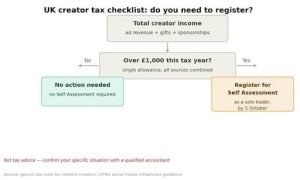
According to gov.uk’s tax guidance for content creators, if your channel earns more than £1,000 in a tax year from any combination of ad revenue, sponsorships, affiliate commissions or gifted products valued as payment, you’ve exceeded the trading allowance and must register for Self Assessment as a sole trader.
Registration has to be completed by 5 October in the tax year following the one in which you first went over the £1,000 threshold. The Low Incomes Tax Reform Group confirms the allowance is a single £1,000 limit across all your self-employed and miscellaneous income combined, not £1,000 per platform, so a bit of YouTube money plus a bit of affiliate income from Instagram counts toward the same total.
Gifted products count too. If a brand sends you £300 worth of kit in exchange for a review, HMRC treats that as income at its market value, whether or not any cash changed hands.
Two things most starter guides leave out entirely are below.
1- If your total self-employed turnover (YouTube plus any other freelance or side income) passes £90,000 in a rolling 12-month period, you’ll also need to register for VAT.
2- And from April 2026, self-employed creators earning over £50,000 a year must file quarterly updates under Making Tax Digital for Income Tax, rather than one Self Assessment return a year.
This isn’t tax advice, and a qualified accountant should confirm anything specific to your situation. What’s worth knowing before you start is that “it’s just a hobby channel” doesn’t hold up once monetisation income clears £1,000, and the registration deadline arrives faster than most new creators expect.
Common Mistakes New UK YouTubers Make
Most of these show up in the first ten videos and quietly stall a channel before it gets going.
- Choosing a niche too broad to rank for, then wondering why nothing gets found in search.
- Ignoring YouTube SEO on titles and descriptions, treating the platform like a video hosting site rather than a search engine.
- Ghost-posting for a month, then going quiet, which resets algorithmic momentum every time.
- Buying subscribers or engagement, which flags accounts for review and rarely survives Partner Programme scrutiny.
- Skipping the About section and channel keywords, both of which help YouTube understand what the channel is about.
Conclusion
Starting a YouTube channel in the UK costs nothing beyond time and, eventually, a decent microphone. What separates channels that last from channels that stall isn’t better equipment, it’s a niche narrow enough to rank for, a consistent upload rhythm, and knowing what happens once the money starts, both on the monetisation side and the HMRC side. Set the channel up properly this week, publish something imperfect rather than waiting for perfect, and revisit your niche and About section once you’ve got a dozen videos of real data to work from.
Ready to start? Set your channel up this week, and bookmark this guide. The equipment, monetisation and HMRC sections will matter more once you’re a few videos in.For more UK platform reviews, influencer insights and creator economy trends, visit the Social Mention UK.
Frequently Asked Questions
- Do I need a business account to start a YouTube channel in the UK?
No. A personal Google account works fine for a hobby or small channel. A Brand Account is worth switching to once you plan to add channel managers or treat the channel as a business, since it keeps the channel separate from your personal Google login. - Can I start a YouTube channel in the UK if I’m under 18?
Yes, with conditions. YouTube requires users to be at least 13, and under-18s need a parent or guardian involved in account management under YouTube’s terms. Parent Zone’s guide covers the practical safety side for parents setting a channel up with a younger creator. - Do I need a limited company to earn money on YouTube in the UK?
No. Most UK content creators operate as sole traders, which has far fewer administrative requirements than registering a limited company.
A limited company only tends to make sense once income and expenses reach a scale where the tax and liability benefits outweigh the extra admin. - What happens if I don’t register with HMRC after going over £1,000?
HMRC can charge penalties for late registration plus interest on any tax owed, and platforms including YouTube now report creator earnings data to HMRC directly. It’s better to register on time than to wait for a nudge letter. - Does watch time from Shorts count toward the 4,000-hour monetisation threshold?
No. Shorts watch time is tracked separately from long-form watch hours, as confirmed on YouTube’s official Partner Programme page. Channels that publish mostly Shorts should aim for the 10 million Shorts views in 90 days route instead of the 4,000-hour long-form threshold.